
Clusterward
App catalog

Kubernetes app catalog: ready-made apps on your cluster in minutes

The app catalog brings proven applications to your Kapsule cluster as tested blueprints. You give a name, a domain and the cluster; Clusterward creates the application, database, a disk with snapshots and the certificate and rolls out. After that it is an ordinary application in the cockpit – nothing stays tied to the blueprint.

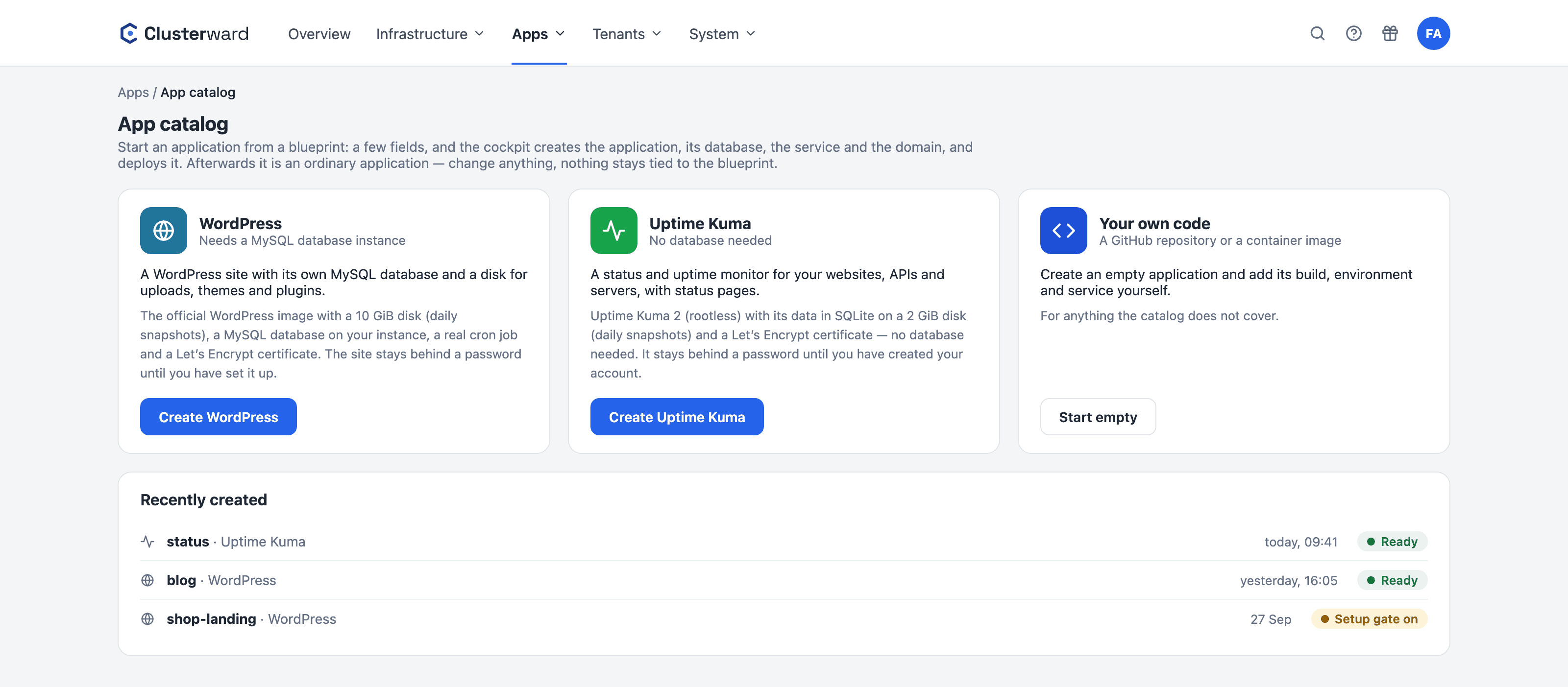
The app catalog in the Clusterward cockpit
The app catalog in the Clusterward cockpit with WordPress, Uptime Kuma and your own code (simplified illustration)
Illustration: a simplified view. The product shows more details and options.
In short

What is the app catalog?

The app catalog is a collection of blueprints for ready-made applications. A blueprint knows how an app runs best on your cluster: Helm chart, database, disk, cron job and certificate. You answer only what is yours – name, domain, cluster and, where the app needs one, the database instance. Clusterward maintains the blueprints and tests each one live before it appears in the catalog.

At a glance

Apps
WordPress, Uptime Kuma – more to come
Inputs
Name, domain, cluster, database if needed
Data
a disk of its own, daily snapshots
Certificate
Let’s Encrypt for your domain
Protection
Setup password until the first account
Afterwards
an ordinary application
The blueprints

Which apps the catalog offers today

A new blueprint joins the catalog only after it has run on a real cluster.

WordPress

A WordPress site with its own MySQL database, a 10 GiB disk for uploads, themes and plugins, a real cron job and a certificate.

Go to WordPress

Uptime Kuma

A status and uptime monitor with status pages for your customers – no database, the data lives on a 2 GiB disk.

Go to Uptime Kuma

Your own code

For anything the catalog does not cover: an empty application in which you create the build, environment and service yourself – from GitHub or a container image.

Go to Deployments
How it works

From blueprint to running app

  1. 01

    Pick a blueprint

    Apps → “App catalog”. The tile shows what the app needs, for example a MySQL instance.

  2. 02

    Fill in the fields

    Name, domain, cluster and, where needed, the database instance. Clusterward checks cluster, name and domain first.

  3. 03

    Clusterward creates

    Application, environment production, chart, database, service with its disk, domain and DNS record – then the deploy.

  4. 04

    Set up and open

    Behind the setup password you set the app up, then “Open to everyone” opens it to all.

What’s included

What every app from the catalog brings

Live-tested blueprints

Every blueprint runs on a real cluster before it appears in the catalog. The image is pinned to the tested version.

Disk with snapshots

Every app gets its own disk with daily snapshots, kept for seven days, restorable on the Volumes card.

Certificate and DNS

Let’s Encrypt for your domain. If the zone is registered at Cloudflare or Scaleway DNS, the record is created automatically.

Protected until setup

Otherwise a fresh app shows its installer to whoever arrives first. The setup password keeps strangers out until your account exists.

Retry or roll back

If a step fails, “Retry” continues from there. “Roll back…” removes everything the run created, in reverse order.

Then an ordinary application

Logs, usage, restart, domain and resources are managed on the usual pages; the chart sits versioned in your templates.

Facts

What you prepare, what the catalog creates

The catalog never creates a database instance – it takes about ten minutes and Scaleway bills it on its own. Everything else is created in the run.

WhatYouThe catalog
Clusterwith the NGINX ingress controllerchecks it before starting
Databasean instance of the engine where needed (WordPress: MySQL)a database and its own user on it
Domaina free hostnamecertificate, record in registered zones
Rightsview of all applications, databases at “Operate”nothing else
Planapplications left in the plandisables the tiles when the limit is reached
What changes

An app on Kubernetes with and without the catalog

Further reading

The catalog in context

What each blueprint creates in detail is described on the pages for WordPress and Uptime Kuma. How the disks are backed up and restored is covered under Volumes & snapshots.

For applications the catalog does not cover, you create the build, environment and service yourself – described under Deployments. If you need the same app for every customer, use a tenant pipeline.

Related pages

What goes with it

WordPress from the catalog

Database, disk with snapshots, cron and certificate in minutes.

Go to WordPress

Volumes & snapshots

Disks per service, scheduled snapshots and restore.

Go to Volumes
FAQ

Frequently asked questions about the app catalog

  • Currently WordPress and Uptime Kuma. More blueprints are added once they have run on a real cluster. For everything else the “Your own code” tile offers an empty application you build up yourself.

Your question isn’t here? Write to us – we usually reply the same working day.

Ask a question

The app catalog in the demo

We create an app from the catalog, open it behind the setup password and show how it carries on as an ordinary application.