
Clusterward
Managed databases

Managed PostgreSQL and MySQL, private to the cluster

Clusterward creates Scaleway database instances without a public endpoint, sets up a dedicated database with its own role and password for each service, and backs up every database before it is deleted.

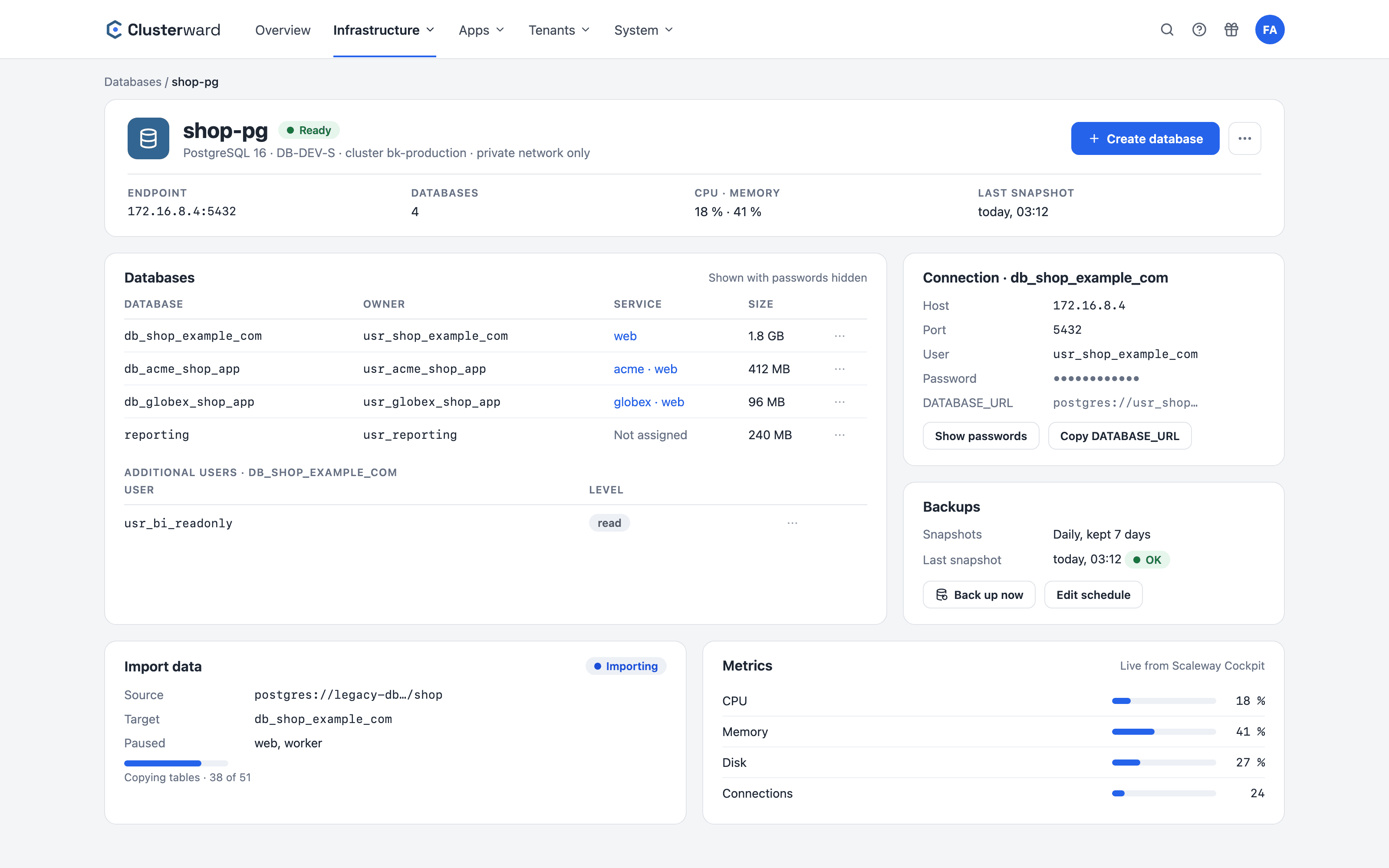
Database instance in the Clusterward Cockpit
Simplified view in the Clusterward cockpit: database instance
Illustration: a simplified view. The product shows more details and options.
In brief

What managed databases in Clusterward are

A managed database is a Scaleway RDB instance for managed PostgreSQL or MySQL that Clusterward creates in your project and manages via the Scaleway API. The instance is attached exclusively to the cluster’s private network; a public endpoint is never created. On the instance, Clusterward creates one database per service with its own owner role and, on request, additional login users with graded privileges. Databases, users and privileges remain visible in the Scaleway console because Clusterward takes no side routes via SQL.

At a glance

Engines
PostgreSQL and MySQL, one instance per run
Network
Private endpoint only, in the cluster’s Private Network
Per service
Dedicated database, dedicated role, generated password
Additional users
read, readwrite or all, never instance admin
Protection
Snapshots, backups with download, dump before every deletion
Import
From any reachable Postgres or MySQL source
Restore
Into a new database alongside the running one
Queries
SQL console in the browser, read-only, with audit log
How it works

From instance to connection

  1. 01

    Create an instance

    Choose engine, name and network; the instance is created with a private endpoint only.

  2. 02

    Create a database

    On the service page: name derived from the domain, role and password included.

  3. 03

    Assign

    The database is assigned to the service immediately; nothing is left half-created.

  4. 04

    Connect

    Copy the connection details and DATABASE_URL in the cockpit and set them as variables.

  5. 05

    Operate

    Additional users, import, metrics and backups on the instance page.

What’s included

What managed databases in Clusterward can do

Everything between “instance created” and “application connected” is handled by the cockpit.

Private access only

The instance gets an endpoint in the Private Network only. Applications in the cluster can reach it, the internet cannot.

One database per service

Name, role and password are derived from the service’s first domain and stored once. Renaming the service later changes nothing about the database.

Additional users with privilege levels

A read user for BI or backups, a write user for a worker. Privileges are revoked first, then granted, and also apply to tables the app creates later.

Import from existing databases

Copy schema and data from an external Postgres or MySQL source into a database on the instance. The application is paused meanwhile, and a non-empty target asks before proceeding.

Backup before deletion

When a tenant is offboarded, every database is backed up first and uploaded to your bucket. Without a secured dump, nothing is deleted.

Metrics in the cockpit

The instance’s CPU, connections and memory live from Scaleway Cockpit, without opening the console.

Backups on the instance page

When the last automatic snapshot ran, how often it runs and how long it is kept – configurable in the cockpit. You can start a backup of a single database at any time.

Backup as a file

A backup is prepared for download and fetched via a short-lived link, as a compressed SQL file.

Restore alongside the running database

A backup is restored into a new database with its own user and password. You switch over when you are ready; the old one stays until you delete it.

Standards, not DIY

Built on Scaleway, not next to it

  • Scaleway RDB

    Instances, databases, users and privileges via the RDB API, visible in the console.

  • PostgreSQL

    Dumps in pg_dump format, restore with pg_restore.

  • MySQL

    Dumps as SQL, restore with the mysql client.

  • Private Network

    Instance and cluster in the same network, no public route.

What changes

Databases with and without Clusterward

SQL console

Look into the database without sharing a password

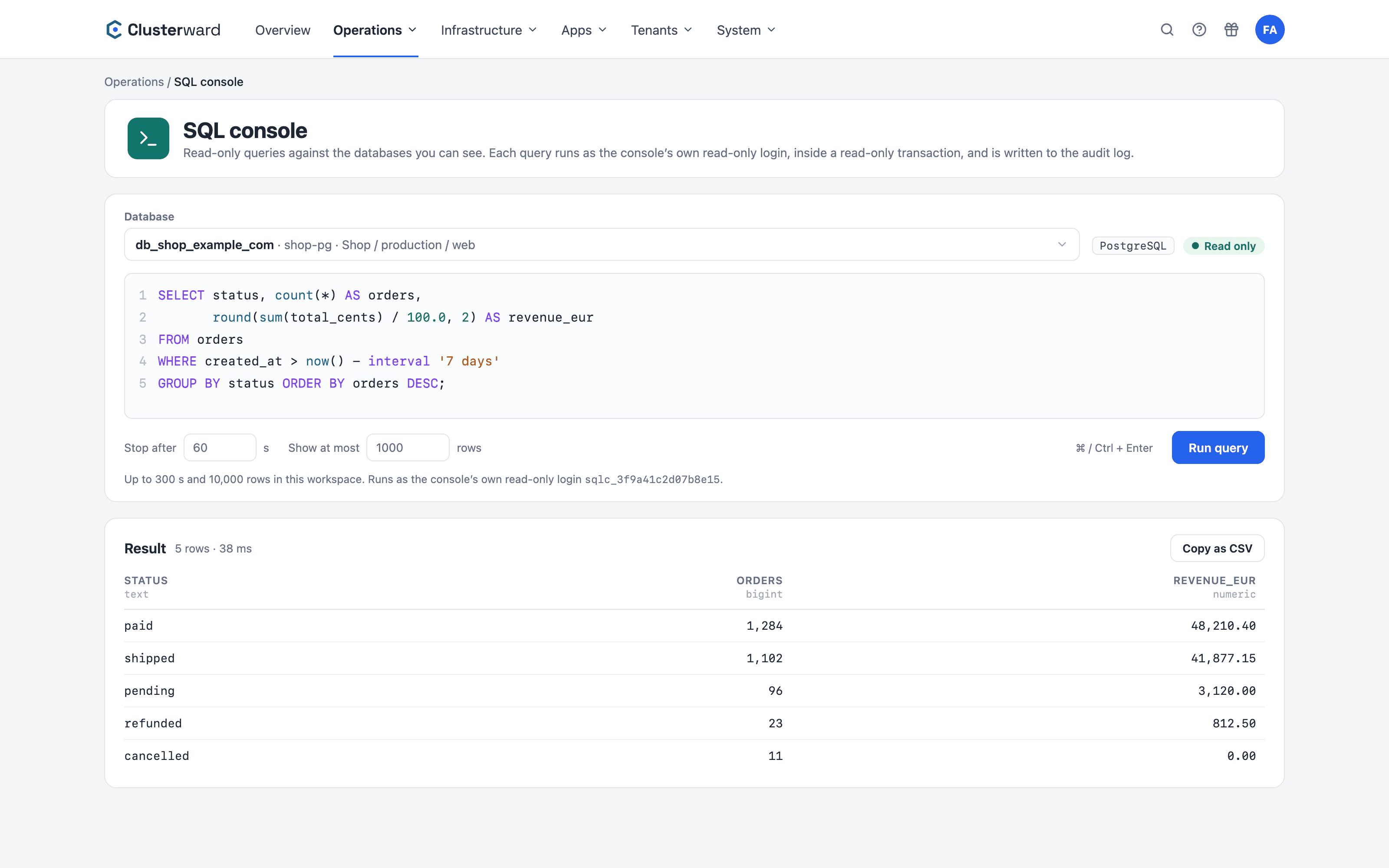
Whether an order arrived or which value a setting holds: the SQL console answers it in the browser. It connects with its own read-only login, runs every query in a read-only transaction and writes it to the audit log. On the instance page, ⋯ → “Query data” opens it with the database already selected.

A query in the SQL console, read-only
SQL-Konsole im Clusterward-Cockpit: Datenbank gewählt, Abfrage und Ergebnis (vereinfachte Darstellung)
Illustration: a simplified view. The product shows more details and options.
Facts

Privilege levels for additional users

There is deliberately no instance-admin level. A leaked application password never reaches beyond its own database.

LevelMayTypical use
readRead all tables, including future onesBI tools, reporting, backups
readwriteRead and writeWorker, second application
allAll privileges within the databaseMigration tools
Owner roleOwner of the databaseThe application itself
Further reading

How databases fit in

The instance is attached to the private network created during Cluster provisioning. The connection details go into the service’s encrypted variables, as described under Deployments.

In a pipeline, the database building block creates a dedicated database for each tenant and hands host, user and password to the workload only at runtime, see Tenant pipelines.

All the ways back – database, volume, earlier version – are brought together in Backups & recovery.

Related features

What goes with it

FAQ

Frequently asked questions about managed databases

  • No. A Scaleway instance has exactly one engine. Clusterward creates one instance per run; if you need both, run the wizard twice. Both instances are attached to the same private network.

Can’t find your question? Write to us – we usually reply on the same business day.

Ask a question

Create a database in the demo

We create a private instance and a database for your service, and connect the application – in just a few minutes.