
Clusterward
Cluster provisioning

Kapsule clusters in minutes, secure by default

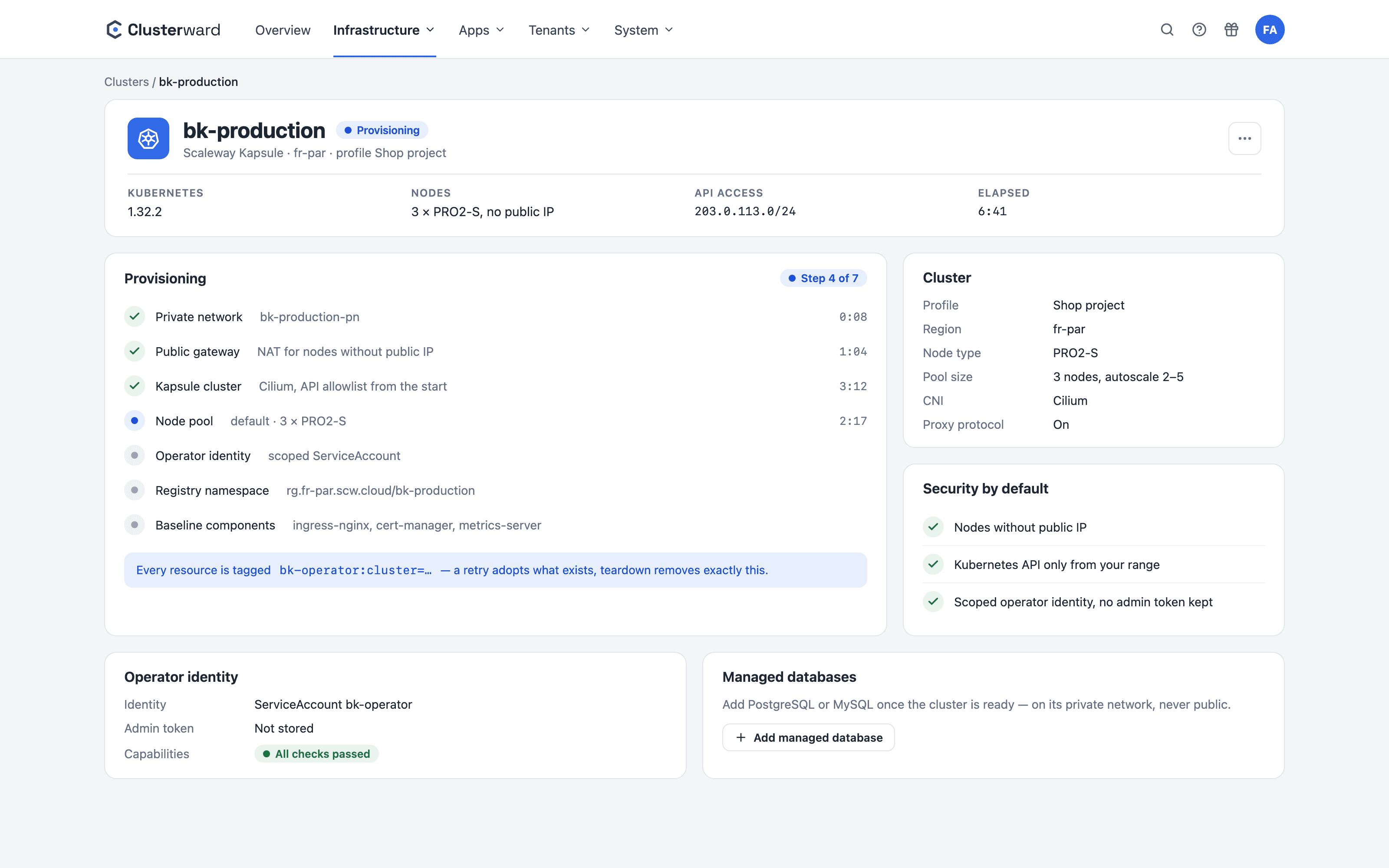
Clusterward creates your Scaleway Kapsule cluster with a private network, a gateway and locked-down API access, installs the ingress controller and cert-manager, and shows every step with its duration in the cockpit.

Cluster provisioning in the Clusterward Cockpit
Simplified view in the Clusterward cockpit: cluster provisioning
Illustration: a simplified view. The product shows more details and options.
In brief

What cluster provisioning means in Clusterward

Cluster provisioning is the wizard Clusterward uses to create a Kapsule cluster, network included, in your Scaleway project. You choose a provisioning profile (the project’s IAM key), a region, the node type and the CIDR range that may reach the Kubernetes API. From that, Clusterward creates a Private Network, a Public Gateway with masquerade, the cluster with Cilium and a node pool without public IPs, fetches the kubeconfig, replaces the admin token with a dedicated, restricted identity and installs the base components. Every resource created is tagged with the cluster ID, so that a rerun picks it up and a teardown removes exactly those resources.

At a glance

Network
Private Network, Public Gateway with masquerade
Nodes
No public IP, pool with the chosen node type
API access
Allowlist restricted to your CIDR from the very first second
CNI
Cilium, NetworkPolicy-capable
Base
Ingress controller, cert-manager, Reflector, registry namespace
Identity
Dedicated ServiceAccount instead of the admin token
How it works

Six steps, all visible

  1. 01

    Choose a profile

    A provisioning profile is the verified IAM key of a Scaleway project.

  2. 02

    Build the network

    The Private Network and the Public Gateway with masquerade come first.

  3. 03

    Create the cluster

    Kapsule with Cilium, bound to the private network, API ACL set.

  4. 04

    Start the pool

    Node pool of the chosen type with public IPs disabled.

  5. 05

    Secure access

    Kubeconfig fetched, restricted identity minted, admin token discarded.

  6. 06

    Install the base

    Ingress controller, cert-manager, Reflector and a private registry namespace.

What’s included

What the wizard does for you

The decisions that otherwise live in a Terraform module or a runbook are defaults here.

Provisioning profiles

One profile per Scaleway project: the IAM key is verified before saving, stored encrypted and never displayed again. “Test” shows the permissions per product.

Secure by default

Nodes without public IPs, the Kubernetes API only from your CIDR, outbound traffic via the gateway. None of it needs to be hardened after the fact.

Repeatable and reversible

Every resource carries the cluster ID as a tag. A restart picks up existing parts; the teardown deletes exactly what was created and nothing else.

Live cluster status

Nodes, pods, capacity and utilization from metrics-server, problematic pods after a grace period, load balancers with their Scaleway mapping.

Restricted operator identity

A ServiceAccount with a ClusterRole that may manage workloads but cannot write cluster RBAC or CRDs. Rotatable and revocable from the cockpit.

Registry per cluster

On creation, a private Container Registry namespace is created in the cluster’s project, because pull permissions follow the project. A push key that may only use this registry is created as well: builds in the cluster push with it and never hold the profile’s key.

Guided connection to your project

When you create a profile, the cockpit guides you through the IAM application and permission sets, with a copy button. On saving, every set is checked; a missing one is named before anything is saved.

Clear about what happens with your key

A help article explains what Clusterward creates and reads with the key, how it is stored encrypted and how you rotate or revoke it.

API access after an IP change

The API access card shows which addresses can reach the Kubernetes API and lets you allow your own with one click – without the Scaleway console.

Standards, not DIY

What Clusterward preinstalls

  • Ingress controller

    ingress-nginx or Envoy Gateway, with the proxy protocol for real client addresses.

  • cert-manager

    Let’s Encrypt issuers for HTTP-01 and DNS-01, ready for wildcards.

  • Reflector

    Mirrors wildcard secrets into every namespace automatically.

  • Cilium

    Kapsule’s CNI, the foundation for the optional NetworkPolicies.

What changes

Creating clusters with and without Clusterward

Facts

What the wizard creates

Every resource is created in your Scaleway project and remains your property. Clusterward only holds the IDs.

ResourceSettingWhy
Private NetworkDedicated network per clusterDatabases and nodes talk privately
Public GatewayMasquerade activeOutbound traffic without public node IPs
Kapsule clusterCilium, API ACL restricted to your CIDRNetworkPolicies and a locked-down API
Node poolpublic_ip_disabledNo attack surface from outside
Registry namespacePrivate, named after the clusterPull permissions follow the project
Operator identityServiceAccount + ClusterRoleNo admin token in circulation
Further reading

After the cluster

Once the cluster is up, you roll out applications via Deployments. A private managed database attaches to the same network in one click, as described under Managed databases.

You maintain the Kubernetes version, node pools and add-ons later without the console via Cluster updates. What the first cluster looks like in practice is shown in the Getting started guide.

Related features

What goes with it

Deployments

Git, container image or Helm chart – rolled out with a health check.

Go to Deployments
FAQ

Frequently asked questions about cluster provisioning

  • An IAM key of the target project with full access to Kubernetes, VPC, Private Networks, Public Gateways, IPAM, Managed Databases and Container Registry. On Scaleway, Private Networks is a separate permission set; VPC alone is not enough. Optionally add Block Storage for volume snapshots, Observability for database metrics and IAM Manager for the registry push key. “Test” shows per product what the key is allowed to do. On saving, the cockpit checks every set individually and names a missing one before anything is saved.

Can’t find your question? Write to us – we usually reply on the same business day.

Ask a question

Your first cluster in the demo

Together, we create a Kapsule cluster in your Scaleway project and roll out the first application on it.