
Clusterward
Bring your own cloud

Bring your own cloud: your clusters in your Scaleway account, provisioned, maintained and upgraded by Clusterward

Clusterward is not a hosting provider. We own no servers and run no data centres: you bring your own Scaleway account, and every cluster, database and bucket is created there – on your Scaleway bill, under your control. Clusterward is the software that sets this infrastructure up securely, maintains it in operation and keeps it up to date.

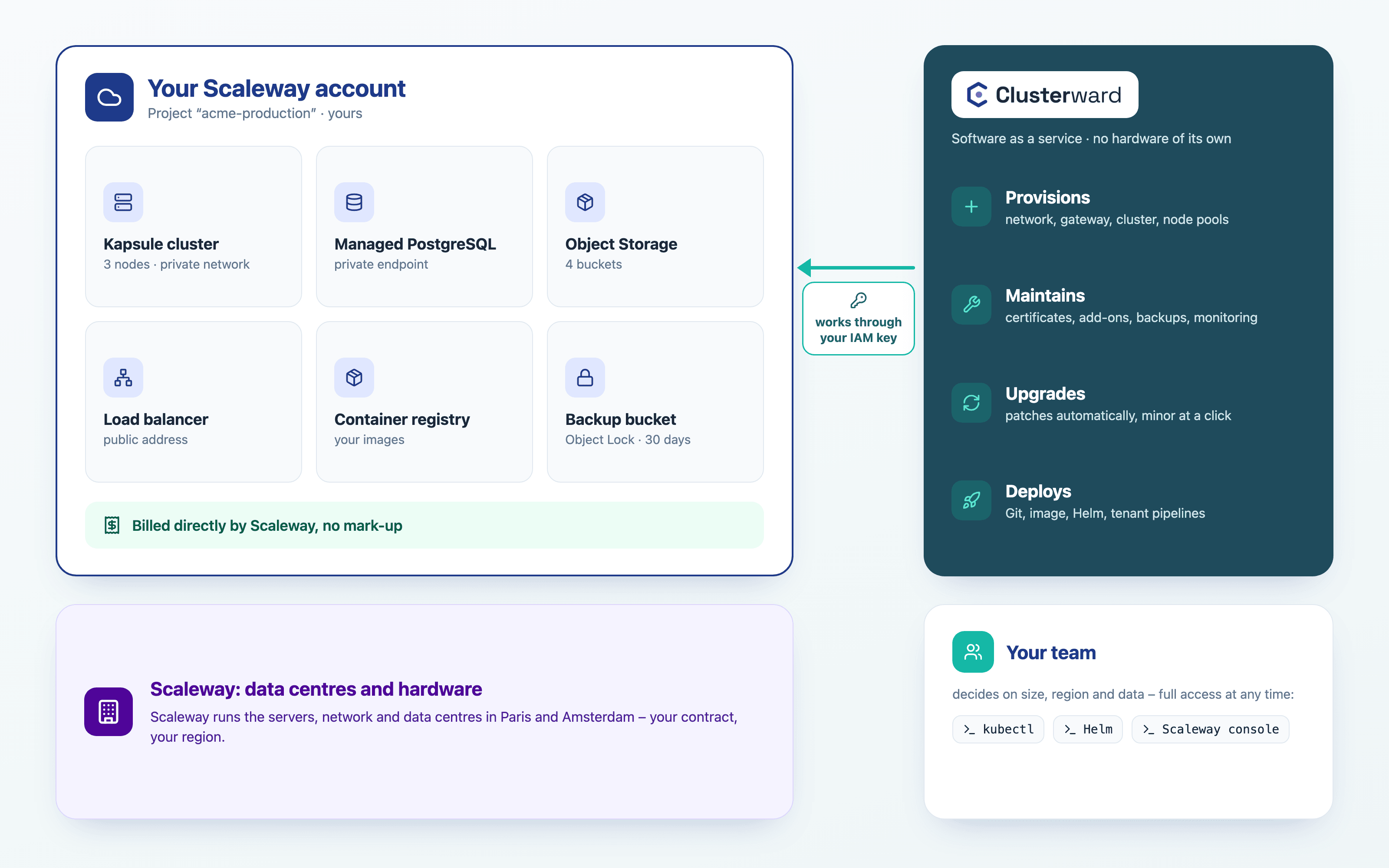
Diagram: your Scaleway account with cluster, database, buckets and load balancer, next to it Clusterward, which provisions, maintains, upgrades and deploys, below it Scaleway as the data centre operator and your team
Who owns what: the infrastructure in your Scaleway account, the control in ClusterwardIllustration: a simplified view. The product shows more details and options.
In short

What does bring your own cloud mean?

Bring your own cloud (BYOC) means: the software comes as a service, the infrastructure stays in your own cloud account. With Clusterward that is your Scaleway project. You create it and store an IAM key with exactly the rights needed; with it, Clusterward provisions Kapsule clusters, databases, buckets and DNS records and takes over day-to-day operations on top. The resources are yours from the start – after a cancellation too.

At a glance

Infrastructure
in your Scaleway account
Data centres
Scaleway, Paris or Amsterdam
Resources
billed directly by Scaleway, no mark-up
Clusterward
software as a service, priced per cluster tier
Access
an IAM key you issue and revoke
After cancelling
everything keeps running in your account
Division of work

Who runs what: Scaleway, Clusterward and your team

Three parties, clear boundaries. Scaleway provides the data centres, the hardware and the Kubernetes control plane. Clusterward turns that into a platform that is set up, maintained and up to date. Your team decides and builds – and keeps full access at any time.

TaskScalewayClusterwardYour team
Data centres and hardwareRuns them––
Kubernetes control planeRuns it (Kapsule)Uses it–
Setting up clustersProvides the servicesNetwork, gateway, nodes without public IP, API accessPicks size and region
Maintenance–Certificates, add-ons, backups, monitoringGets the alerts
Kubernetes upgradesShips new versionsPatches in the maintenance window, minor upgrade at a clickConfirms the minor upgrade
Applications and data–Builds, deploys, backs upWrites the code, decides about data
Bill for resourcesBills you directlyAdds no mark-upPays Scaleway
How it works

How you bring your cloud

  1. 01

    Create a Scaleway project

    A project of its own in your Scaleway account, so costs and rights stay cleanly separated.

  2. 02

    Store a key

    An IAM application with exactly the rights from the list; Clusterward checks them before it stores the key.

  3. 03

    Provision a cluster

    Pick region, node type and count. Clusterward creates network, gateway, cluster and node pool – nodes without a public IP.

  4. 04

    Deploy and operate

    Roll out applications and onboard customers; maintenance and upgrades run in the cockpit.

In operation

What “maintained and upgraded” means in practice

Kubernetes upgrades

Kapsule applies patch versions automatically in a maintenance window you choose. Clusterward offers the next minor upgrade and carries it out once you confirm – the nodes included.

Add-ons on tested versions

Clusterward installs ingress controllers, cert-manager and other components in tested versions and tells you when an update is ready.

Certificates

cert-manager renews Let’s Encrypt and wildcard certificates. A certificate that expires soon or is not ready shows up on the dashboard under “Needs you”.

Backups

Nightly bucket backups with Object Lock, database backups and volume snapshots. Bucket backups are tested with a sample every month.

Monitoring

Clusterward reports failing pods, sites that are down and failed deploys by e-mail or webhook, Slack and Teams included.

Node pools

Create, scale and remove pools. Clusterward shows which nodes still run an older version.

The difference

Hosting or bring your own cloud?

Data

What lives on the Clusterward platform – and what does not

Your applications, databases, buckets and volumes live in your Scaleway account. The Clusterward platform holds your workspace: configuration, encrypted credentials and the audit log, in a database of its own with a key of its own. The platform runs on Scaleway in the EU too; BitKollegen owns no hardware.

WhatWhere
Clusters, nodes, load balancersYour Scaleway account
Databases, buckets, volumesYour Scaleway account
Bucket backupsYour Scaleway account, a project and region you choose
Container imagesRegistry in your Scaleway project
SecretsScaleway Secret Manager in your project or encrypted in the workspace
Workspace: configuration, credentials, audit logClusterward platform on Scaleway in Amsterdam
Backups before an offboardingYour workspace’s storage on the platform
Access

What access Clusterward gets

Clusterward works with the IAM key you create, and only for what your users trigger in the cockpit and for scheduled tasks such as backups and monitoring. From Kubernetes 1.30 it runs in the cluster as an identity of its own that reads without secrets and writes only in the namespaces it created for your environments. It fetches admin access only when needed, for add-ons for example, and only for one hour.

Access at a glance

IAM key
created by you, checked before it is stored
Storage
encrypted, cannot be read back
In the cluster
writes only in its own namespaces
Admin access
when needed, for one hour
Revoking
delete the key in the Scaleway console
Further reading

Bring your own cloud in context

Which rights the IAM key needs and how the first cluster is created is shown in Getting started and Cluster provisioning.

How Kubernetes upgrades, node pools and add-ons work is covered in Cluster updates. What Clusterward costs and what Scaleway bills is listed under Pricing.

Related pages

What goes with it

Cluster provisioning

Kapsule clusters in your project, secure by default.

Go to provisioning

Digital sovereignty

Where your data lives and how you switch providers.

Go to sovereignty
FAQ

Frequently asked questions about bring your own cloud

  • No. Your applications run on Kapsule clusters in your own Scaleway account. Clusterward sets these clusters up, deploys your applications to them and keeps both running – Scaleway provides the compute and bills it to you directly.

Your question isn’t here? Write to us – we usually reply the same working day.

Ask a question

Bring your own cloud in the demo

Using a Scaleway project, we show what gets created and how maintenance and upgrades work – and estimate the Scaleway costs of your setup with you.