
Clusterward
Tenant pipelines

Tenant onboarding as a pipeline, not a runbook

Describe once what a new customer needs: database, domain, buckets, workload. Clusterward runs the pipeline per tenant, with progress, retry, rollback and an offboarding that backs up first and tears down second.

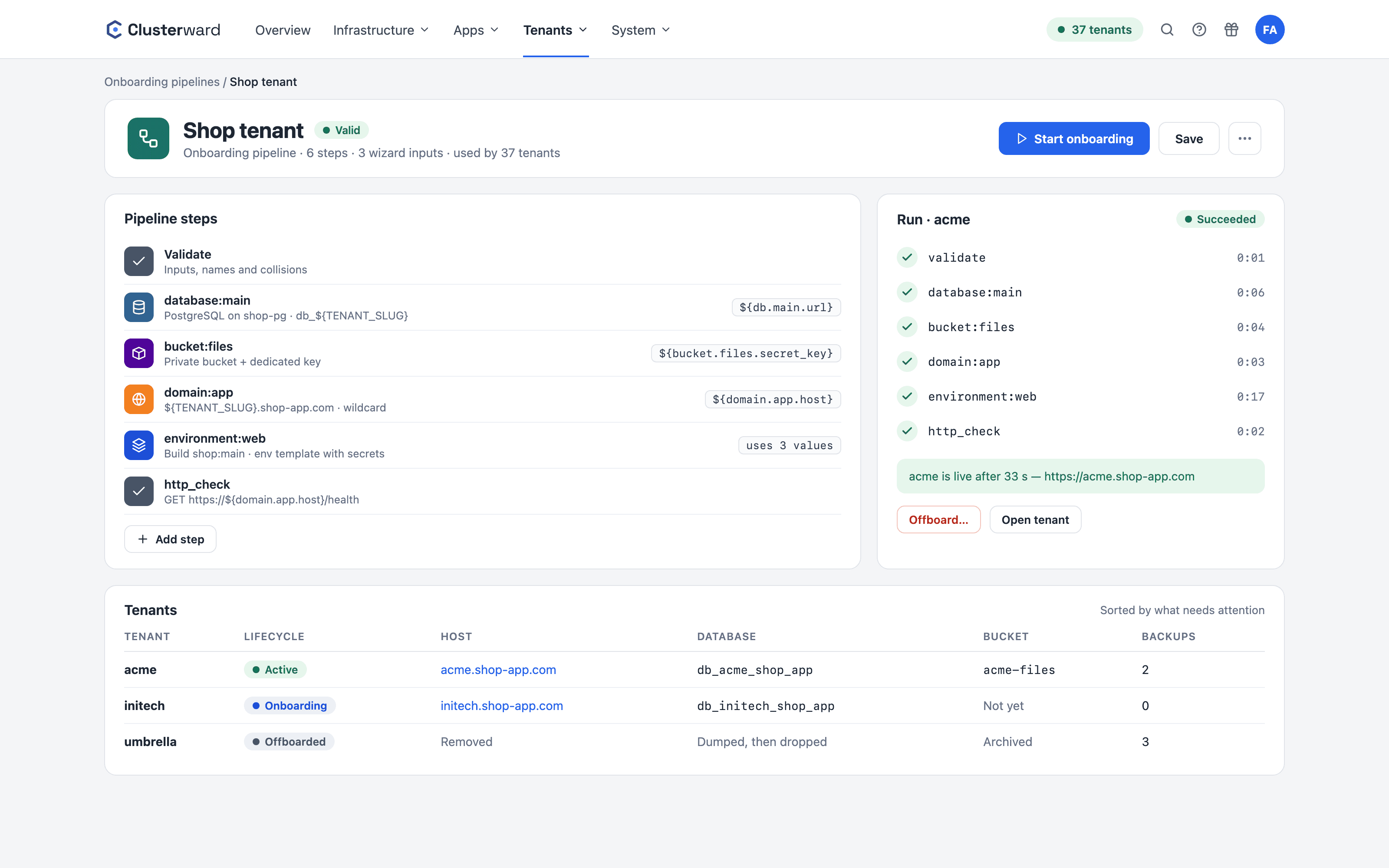
Onboarding pipeline in the Clusterward Cockpit
Simplified view in the Clusterward cockpit: onboarding pipeline
Illustration: a simplified view. The product shows more details and options.
In brief

What a tenant pipeline is

A tenant pipeline is an ordered list of steps that Clusterward runs for every new tenant. The steps are building blocks: a database on an instance, a domain with record and certificate, one or more buckets with their own key, an environment with an application or container, a Helm workload. Each building block publishes values on a variable bus, such as the database URL or hostname, which later steps only resolve at execution time. The designer checks the order, onboarding runs in the background, and every step can be retried or rolled back.

At a glance

Building blocks
Database, domain, bucket, environment, workload, HTTP check
Variables
Resolved only at runtime, passwords never stored in the run
Inputs
Declared wizard fields, preflight checks for collisions
Failures
Retry from the failed step, rollback in reverse
Offboarding
Dump and archive first, then teardown
Integration
Your application orders tenants itself via a provisioning source
How it works

From designer to running tenant

  1. 01

    Design the pipeline

    Add and order building blocks; the designer rejects broken sequences.

  2. 02

    Enter the customer

    The wizard only asks for the customer details and the declared inputs.

  3. 03

    Preflight

    Database names, hosts, service names and buckets are checked live for collisions.

  4. 04

    Steps run

    Each step saves its resources immediately; waiting times block nothing.

  5. 05

    Tenant active

    Host, service, database and buckets appear on the tenant page with live status.

What’s included

What tenant pipelines in Clusterward can do

An onboarding that today lives in scripts, tickets and people’s heads becomes data everyone on the team can read.

Building blocks instead of scripts

Each building block is a step with prerequisites and outputs. Database, domain, bucket, environment and workload can be combined freely and created inline in the designer.

Variable bus with late binding

Workloads use ${db.main.url} or ${domain.app.host}. The values are only read at execution time; the database password never appears in the run.

Preflight before the start

The wizard resolves the exact specification and checks every artifact name against the instance, the domains and the buckets. A conflict blocks the start; an inconclusive check only warns.

Retry and rollback

A failed step is retried without recreating anything that came before. Rollback runs the compensations in reverse: database gone, records gone, services torn down.

Offboarding with backup

First back up every database and archive non-empty buckets, then tear down. Nothing is deleted without a secured dump.

Provisioning sources

Your application orders onboarding and offboarding via a documented protocol; Clusterward polls it, fulfills the requests and reports the status back.

Secrets straight from the pipeline

A line KEY=secret:value in an environment building block’s env template becomes a write-only secret of the service – in the Scaleway Secret Manager if you want, in the service’s folder.

Chart secrets for Helm tenants

Before the first rollout, a workload building block creates chart secrets: generated keys, wizard inputs or database passwords. The values read them as ${secret.NAME}.

Networking per tenant service

Environment building blocks carry the service’s network settings with them: timeouts, retries, rate limits, CORS and basic auth.

Standards, not DIY

What a run creates in the cluster

  • Environment

    One namespace per tenant, pinned at creation, never recomputed from the name.

  • Workload

    Application from a build, container image or Helm chart with values from the bus.

  • Env template

    Dotenv template with bus values and freshly generated secrets per occurrence.

  • Host

    Record, ingress and certificate; a Cloudflare proxy is detected.

What changes

Onboarding with and without Clusterward

Facts

The building blocks at a glance

Each building block creates its resources idempotently and knows its compensation for the rollback.

ComponentCreatesPublishesRollback
DatabaseDatabase and owner role on an instancename, user, password, host, port, urlDrop
DomainRecord, ingress, certificate, optional ingress classhost, urlDelete its own records
Bucket1..n buckets, optionally a keyaccess_key, secret_keyDelete empty buckets and keys
EnvironmentNamespace and a service from a build or imageService and hostUndeploy, namespace, environment
WorkloadHelm release from the template libraryService and hostUninstall and delete
HTTP checkNothing; waits for a healthy responseNothingNothing
Further reading

Pipelines in context

The building blocks use the same functions as the cockpit: the database is created as described under Managed databases, the host as under DNS & certificates, the bucket as under Object Storage.

If you run many customers, the SaaS vendors page shows the way from the first cluster to an orderable pipeline.

Related features

What goes with it

FAQ

Frequently asked questions about tenant pipelines

  • In a live run, a pipeline with a database, domain and container workload finished in under a minute. The duration depends on certificate issuance and application startup; verification steps wait patiently and can be deliberately skipped while DNS is still propagating.

Can’t find your question? Write to us – we usually reply on the same business day.

Ask a question

Your onboarding as a pipeline

Bring your current runbook. In the demo, we rebuild it as a pipeline and run the first tenant.