
Clusterward
Migrating from Qovery

From Qovery to Clusterward, without a big bang

Your cluster stays, your repositories stay, your domains stay. Clusterward connects the existing cluster, takes over one application at a time and imports databases and buckets with a pause instead of an outage. For a tenth of the price.

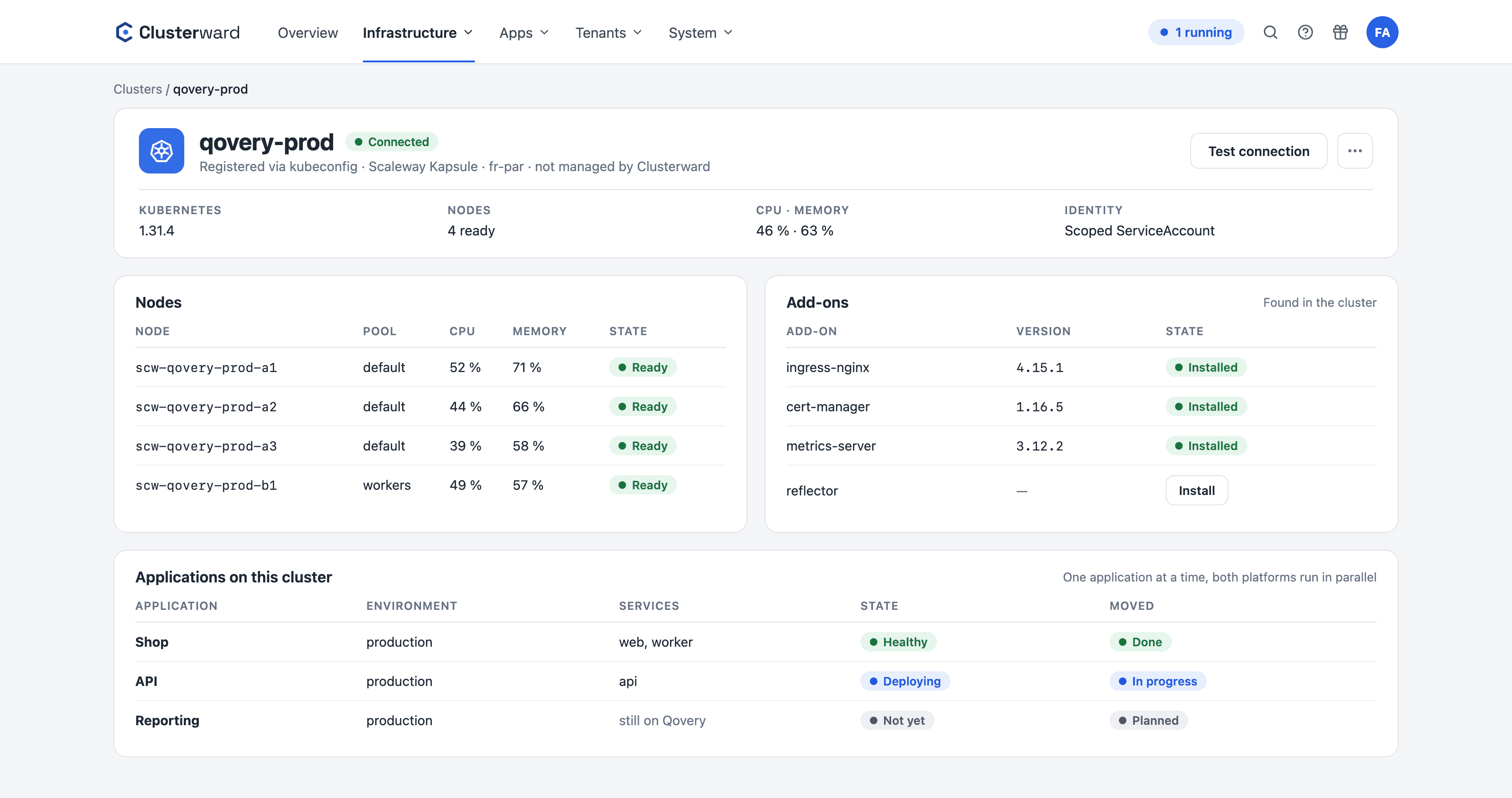
Cluster page in the cockpit after connecting: nodes, add-ons and the first applications taken over
Simplified view in the Clusterward cockpit: connected cluster with adopted applications
Illustration: a simplified view. The product shows more details and options.
In brief

What migrating from Qovery involves

Qovery and Clusterward do similar things: they roll out applications from Git to Kubernetes and manage databases, domains and environments. The difference lies in price, cloud and data ownership. So a migration does not mean rebuilding, it means taking over: the Kapsule cluster is registered via kubeconfig, each application is created as a service with a build, environment variables are copied, the database is imported into a private managed instance by a job, buckets are copied and DNS is switched over. One application at a time, with Qovery as a fallback, until the last one has moved.

At a glance

Clusters
Existing Kapsule cluster via kubeconfig, or a new one secure by default
Applications
One service per application, built from the repository
Databases
Imported by a job, application paused, not shut down
Buckets
Copied from any S3 bucket, never deleted
Domains
Cloudflare zones, wildcard certificate, DNS last
Order
Staging first, then one production environment after another
How it works

Six steps per application

  1. 01

    Connect the cluster

    Import the kubeconfig, verified and encrypted. Or create a new cluster with private nodes.

  2. 02

    Create an application

    Repository, branch, Dockerfile: the same build as on Qovery, built with Kaniko or GitHub Actions.

  3. 03

    Copy variables

    Environment variables go into the encrypted editor; multi-line values stay intact.

  4. 04

    Import the database

    A job copies schema and data into a private managed instance; the application is paused in the meantime.

  5. 05

    Copy buckets

    Objects from the old bucket into a dedicated one with its own key, repeatable.

  6. 06

    Switch DNS

    Add the host to the service, the record and certificate are created, then DNS points to the new ingress.

What’s included

What makes the migration easy

Every step is a cockpit feature, not a one-off migration script.

Connect existing clusters

A Kapsule cluster is registered via its kubeconfig; the token is verified before it is stored. Clusterward installs nothing without asking; you view add-ons and update them deliberately.

Database import with a pause

The import runs as a job in the cluster, checks the source, scales the application down to zero instances, copies, and starts it again. A non-empty target asks for confirmation instead of overwriting.

Bucket import without deletion

Objects are copied from any reachable S3 bucket, with progress display and cancellation. Copy and overwrite, never delete; a second run is idempotent.

Running in parallel

As long as DNS points to Qovery, everything keeps running there. You switch over host by host and can go back until you cancel Qovery. If the records already sit in a Cloudflare zone, Clusterward adopts them and switches them itself at go-live instead of creating second ones.

Domains and certificates

Register Cloudflare zones, records are created automatically, certificates per host or as a wildcard. A host behind the Cloudflare proxy is detected.

A tenth of the price

According to its price list, Qovery Business costs $2,999 per month for three clusters and twenty users. Clusterward Team costs €299 for ten clusters and unlimited users.

What stays, what changes

What you keep

  • Kubernetes

    The same cluster, the same namespaces, server-side apply instead of Terraform.

  • Dockerfile

    The same build, built by Kaniko in the cluster or by GitHub Actions.

  • Helm charts

    External charts go into the template library and are pinned to a version.

  • Repositories and domains

    Nothing is moved, only reconnected.

What changes

What changes with the move

Facts

Qovery terms and their counterparts

The model is familiar. The terms differ in only a few places.

QoveryClusterwardDifference
Organization / ProjectWorkspace / applicationThe workspace has its own database and key
EnvironmentEnvironmentA namespace on exactly one cluster
ApplicationService with a buildBuild and image belong to the application, not to the service
Managed DatabaseManaged databaseScaleway instance, private only, one database per service
Custom DomainDomain on the serviceRecord created automatically, TLS per domain or wildcard
Lifecycle JobPipeline building blockOnboarding per customer instead of per deployment
SecretSecret on the serviceWrite-only, optionally in Scaleway Secret Manager
Advanced SettingsNetworking cardTimeouts, rate limits, CORS, basic auth, with a default per field
API tokenAPI tokenWith role, scope and expiry date
Terraform ExportNo export neededObjects live in your cluster and project
Further reading

Dig deeper

Read the full comparison, with tables and the areas where Qovery is stronger, under Clusterward vs. Qovery. How the database import works in detail is described under Managed databases.

An existing cluster is all you need for the first step; the Getting started guide takes you from the workspace to the first deployment. The plans are listed under Pricing.

Related pages

What goes with it

Deployments

Git, container image or Helm chart – rolled out with a health check.

Go to Deployments
FAQ

Frequently asked questions about migrating from Qovery

  • No. An existing Kapsule cluster is connected via its kubeconfig; Clusterward verifies the token, stores it encrypted and initially only reads. The ingress controller and cert-manager that Qovery installed can stay or be replaced step by step with the add-ons managed by Clusterward.

Can’t find your question? Write to us – we usually reply on the same business day.

Ask a question

Start your migration in the demo

Bring your Qovery setup. We connect your cluster and move the first application together.