
Clusterward
Secrets

Secrets management where passwords never sit in plain text again

Clusterward separates variables and secrets from the very first save, stores secrets in the Scaleway Secret Manager if you wish, and reliably carries rotations from the console all the way into the pods.

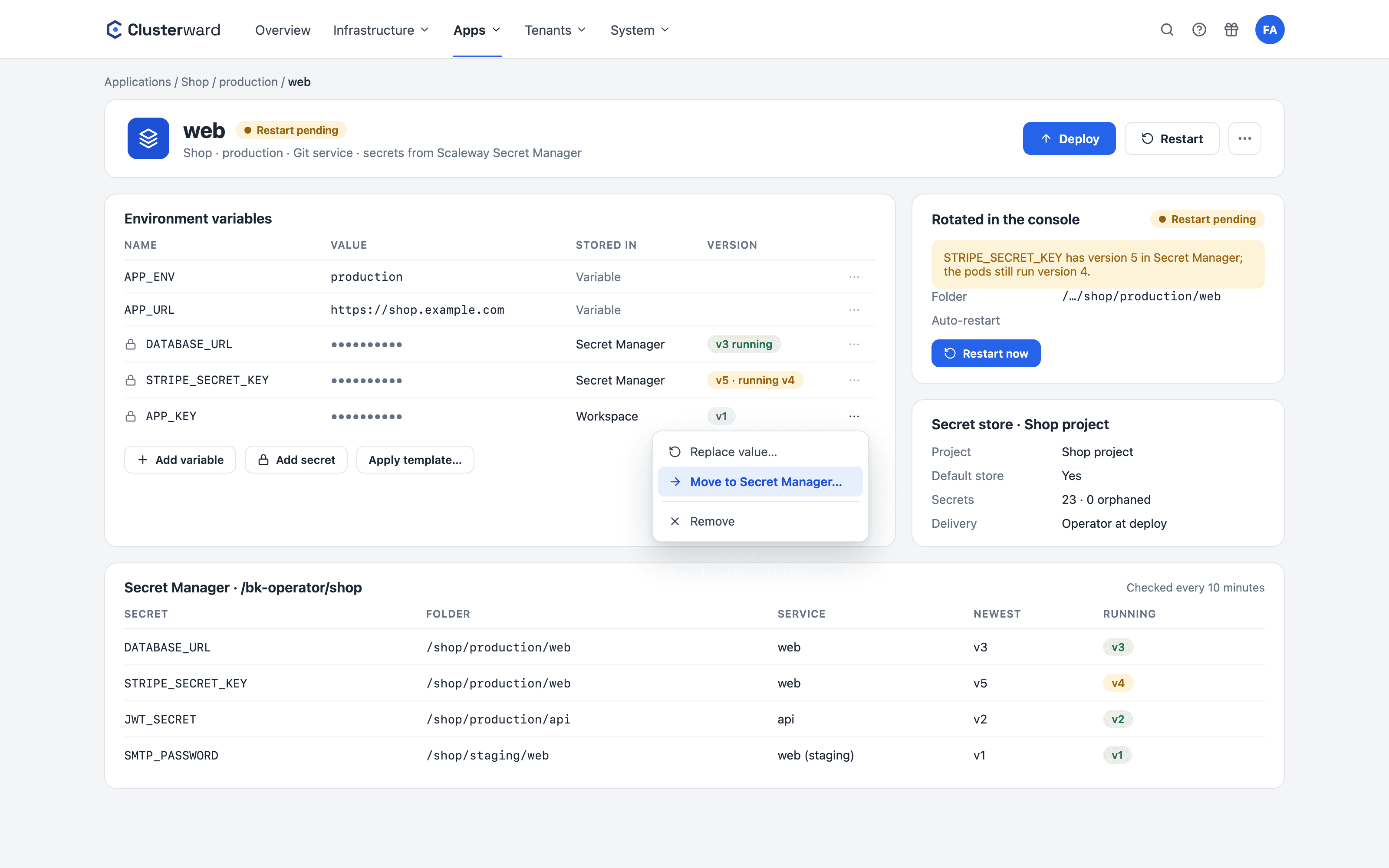
Secrets of a service in the Clusterward Cockpit
Simplified view in the Clusterward cockpit: secrets of a service
Illustration: a simplified view. The product shows more details and options.
In brief

What secrets management means in Clusterward

Secrets management in Clusterward means: every environment variable of a service is either a readable variable or a secret, and that choice is made when it is created. From the moment it is saved, a secret can only be overwritten – no interface ever returns its value. It is stored encrypted in your workspace’s database or in the Scaleway Secret Manager of your project. On deployment, the current value lands in the cluster as a Kubernetes Secret, delivered by the External Secrets Operator if you wish.

At a glance

Types
Variables readable, secrets write-only
Storage locations
Workspace database or Scaleway Secret Manager
Encryption
AES-256-GCM in the database
Rotation
New versions detected, restart on request
Delivery
On deployment or via the External Secrets Operator
Helm
${secret.NAME} in the values, never stored
How it works

From password to pod

  1. 01

    Create a secret

    “Add secret” instead of “Add variable”, with a storage location.

  2. 02

    Store

    Encrypted in the workspace or as a secret in the Secret Manager.

  3. 03

    Roll out

    The deployment reads the latest version and writes the Kubernetes Secret.

  4. 04

    Rotate

    A new version created in the console is detected within ten minutes.

  5. 05

    Restart

    The service restarts on its own or shows “Restart pending”.

What’s included

What secrets in Clusterward include

The rules that otherwise live in wiki pages and code reviews are enforced by the cockpit.

Write-only from the moment of saving

A secret shows a lock and a masked value. Editing replaces it; an empty field keeps it. There is no way back to a readable variable.

Scaleway Secret Manager

A secret store is a Secret Manager project with a verified IAM key. Clusterward creates, versions and deletes secrets there, organized by app, environment and service.

Rotation without guesswork

Every ten minutes, Clusterward checks every stored secret for a newer version. The running and the latest version are shown on the service, and a deleted secret is reported.

External Secrets Operator

Installed as an add-on, the operator delivers the secrets inside the cluster. Every deployment forces a sync and waits for it.

Chart secrets for Helm

A Helm chart’s passwords appear as ${secret.NAME} in the values. Clusterward inserts them securely masked on every deployment and never stores them in the values.

Plain text becomes visible

Variables with names like APP_KEY or *_PASSWORD are flagged and can be converted with the lock. The Values card warns about hard-coded values for password or token.

Folders by app, environment and service

Secrets live in the Secret Manager under /bk-operator/<App>/<Environment>/<Service>. After a rename, they move on their own; “Clean up” re-sorts older ones.

Move to the Secret Manager

A secret from the workspace database moves into a store with “Move to Secret Manager…”. The next deploy reads it from there.

Secrets from templates and pipelines

Env templates and pipeline blocks name secrets without a value: NAME=secret: prompts for the value when applied, NAME=secret:${generate.hex64} generates a new one for each service.

Standards, not DIY

Built on proven components

  • Secret Manager

    Scaleway’s managed service for versioned secrets.

  • External Secrets

    The standard operator for external secret sources in Kubernetes.

  • Kubernetes Secrets

    One secret per release, passed into the pods via envFrom.

  • AES-256-GCM

    Authenticated encryption for everything in the database.

What changes

Secrets with and without Clusterward

Facts

Where a secret lives and who reads it

Selectable per secret, with a default per workspace. A secret keeps its location until you explicitly move it.

Storage locationProperties
Workspace databaseAES-256-GCM encrypted, key per workspace
Scaleway Secret ManagerVersioned, visible in the console, folder per app
Existing secret in the Secret ManagerReferenced only, never overwritten or deleted
In the clusterKubernetes Secret, from the deployment or from the External Secrets Operator
In the audit logOnly the name, never the value
In pipelinesDatabase passwords read only at runtime, never stored in the run
Further reading

How secrets fit in

Secrets belong to a service and are rolled out with every deployment. Who may read, create or delete a secret is governed by the roles under Security & access.

Rotations are announced via notifications to Slack, Teams, webhook or email, once per new version.

Related pages

What goes with it

Deployments

Git, container image or Helm chart – rolled out with a health check.

Go to Deployments
FAQ

Frequently asked questions about secrets

  • A variable stays readable in the cockpit – a feature flag or a URL, for example. Once saved, a secret can only be overwritten: no interface returns the value, not even for administrators. The choice is made when it is created.

Can’t find your question? Write to us – we usually reply on the same business day.

Ask a question

Secrets in the demo

We create a secret in the Secret Manager, rotate it in the console and show how the service picks up the new version.