
Clusterward
Notifications

Notifications that only report what has changed

A deployment fails, a pod stays unhealthy, a certificate is about to expire, an upgrade is due: Clusterward reports it via webhook, Slack, Teams or email. Once per event, with an all-clear.

Notifications in the Clusterward Cockpit
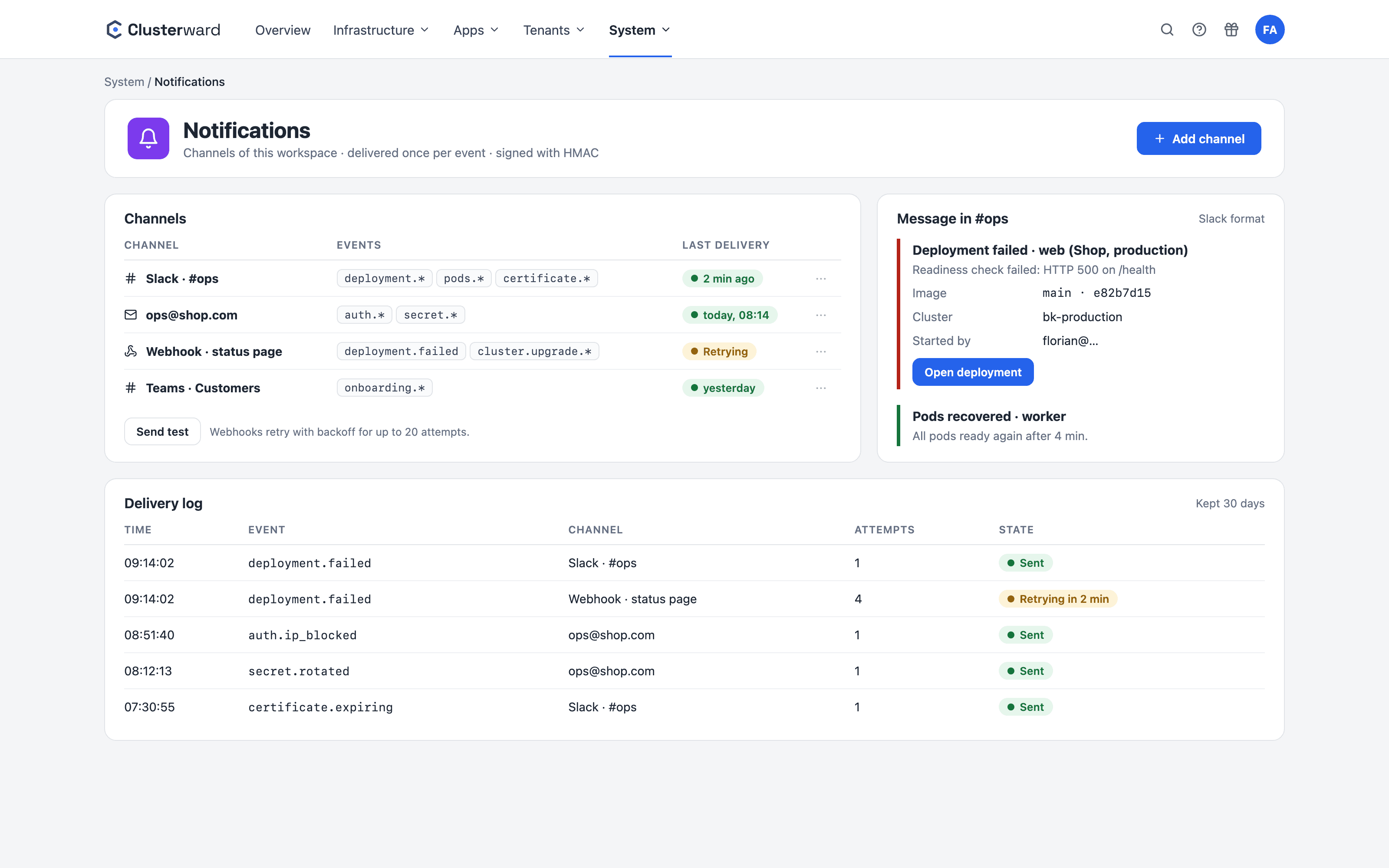
Simplified view in the Clusterward cockpit: notifications
Illustration: a simplified view. The product shows more details and options.
In brief

What notifications are in Clusterward

Notifications are per-workspace channels that receive selected events from operations: a webhook with a JSON envelope or in Slack and Teams format, or an email address. Event sources are deployments, onboarding runs, imports, add-on installations and two watchers: one observes pods per cluster and reports only transitions, the other checks certificates daily. Every notification lands in a queue, is delivered with retries, signed with HMAC and built without secrets.

At a glance

Channels
Webhook, Slack, Teams, email
Events
Subscribable per channel
Delivery
Queue, retry with backoff, test send
Signature
HMAC-SHA256 over the body when a secret is set
Pods
Only transitions: once when unhealthy, once when recovered
Certificates
Daily, warning 14 days before expiry
How it works

From event to message

  1. 01

    Event

    A deployment, a run or a watcher produces exactly one message per channel and event.

  2. 02

    Composition

    The content is built from a whitelist of fields; error texts are scrubbed of credentials.

  3. 03

    Queue

    The message waits as a row, independent of whatever triggered it.

  4. 04

    Delivery

    Webhook or SMTP, signed, with backoff from seconds to minutes.

  5. 05

    Channel status

    Last delivery and last error are shown on the channel.

What’s included

What sets notifications in Clusterward apart

What matters is not the number of alerts, but whether each one calls for action.

Channels and messages

Where your team already reads – with the way to the cause.

  • Webhook, Slack, Teams

    A webhook receives a JSON envelope; Slack and Teams URLs are detected and get a text message. https only, with a signature when a secret is set.

  • Email channels

    Delivery via the platform’s SMTP server to any address, without mail infrastructure of your own.

  • Designed emails

    Emails come with a logo, a colored status line, the details as a table and a button to the right page, in the mail client’s dark mode too. Sender, subject and footer name your workspace’s domain and the operator’s company details – a plain-text version is always included.

  • Straight to the logs

    The message about a failed deployment links to the service’s logs; for a crash, to the previous run.

Operations in view

Pods, sites, certificates and versions – reported when it matters.

  • Pod watcher with memory

    A pod is only flagged once it shows up in two consecutive snapshots. One message per episode, one all-clear when it recovers.

  • Site unreachable

    Uptime checks test a service’s domains from the outside. After two consecutive failures, a message goes out; after the first success, the all-clear.

  • Certificate watcher

    Daily and shortly after startup: managed wildcards are renewed, and every certificate with less than 14 days left or without Ready status is reported, once per day.

  • Upgrade notices

    New Kubernetes versions and add-on versions from the catalog appear once per version, not on every run.

Security and secrets

Suspicious sign-ins and rotations, without giving away secrets themselves.

  • Sign-in alerts

    Admins find out when an address has been blocked after too many failed attempts or an account has been locked. Users get an email when their account is signed in from a new address.

  • Secret rotation reported

    A new version in Secret Manager is reported, a deleted secret once – before the next deploy fails because of it.

  • No secrets in the content

    Content is built from whitelists, error texts are scrubbed, and a message with a field that looks like a secret is discarded instead of sent.

Standards, not DIY

Delivery that blocks nothing

  • Outbox

    One row per channel and event; creating it can never make a deployment fail.

  • Backoff

    Retries from seconds to minutes; a permanent rejection ends delivery immediately.

  • HMAC

    X-Operator-Signature over the body, verifiable on your side.

  • SMTP

    Platform-wide mail delivery without a cloud SDK.

What changes

Alerts with and without Clusterward

Facts

Events you can subscribe to

Each channel subscribes to its own selection. A Slack channel for deployments, an email address for certificates.

EventSourceMeaning
deployment.failed / healthyDeploymentsRollout failed or healthy
onboarding.failed / succeededTenant pipelinesOnboarding run failed or completed
import.failedDatabase and bucket importAn import failed
pods.attention / recoveredPod watcherPods flagged or healthy again
certificate.expiringCertificate watcherLess than 14 days left or not ready
addon.failed / upgraded / upgrade_availableAdd-onsInstallation failed, upgrade completed, new version in the catalog
volume.snapshot.failedVolumesA scheduled snapshot failed
cluster.upgrade_available / finished / failedCluster updatesNew Kubernetes version, upgrade finished or failed
secret.rotated / secret.missingSecretsNew version in Secret Manager or secret deleted
auth.ip_blocked / auth.account_lockedSign-inAddress blocked after failed attempts, or account locked
uptime.down / recoveredUptime checksSite unreachable or reachable again
Further reading

Notifications in context

Most events come from Deployments and Tenant pipelines; the certificate watcher belongs to DNS & certificates.

Which users may create channels is governed by their role in the Users area, described under Security & access.

Uptime checks, resource usage and logs on the service are covered in Logs & monitoring.

Related features

What goes with it

Deployments

Git, container image or Helm chart – rolled out with a health check.

Go to Deployments
FAQ

Frequently asked questions about notifications

  • Webhooks with a JSON envelope, Slack and Teams webhooks with a text message, and email. Each channel selects its own events; a workspace can have any number of channels. “Send test” delivers a sample message immediately.

Can’t find your question? Write to us – we usually reply on the same business day.

Ask a question

Set up alerts in the demo

We connect your Slack or Teams channel, send a test message and trigger a real deployment event.