
Clusterward
SQL console

SQL console for production databases, read-only

Sometimes someone has to check what is really in the database: whether an order arrived, how many customers use a feature, which value a setting holds. Clusterward’s SQL console answers that in the browser – read-only, without handing out a password, and with every query in the audit log.

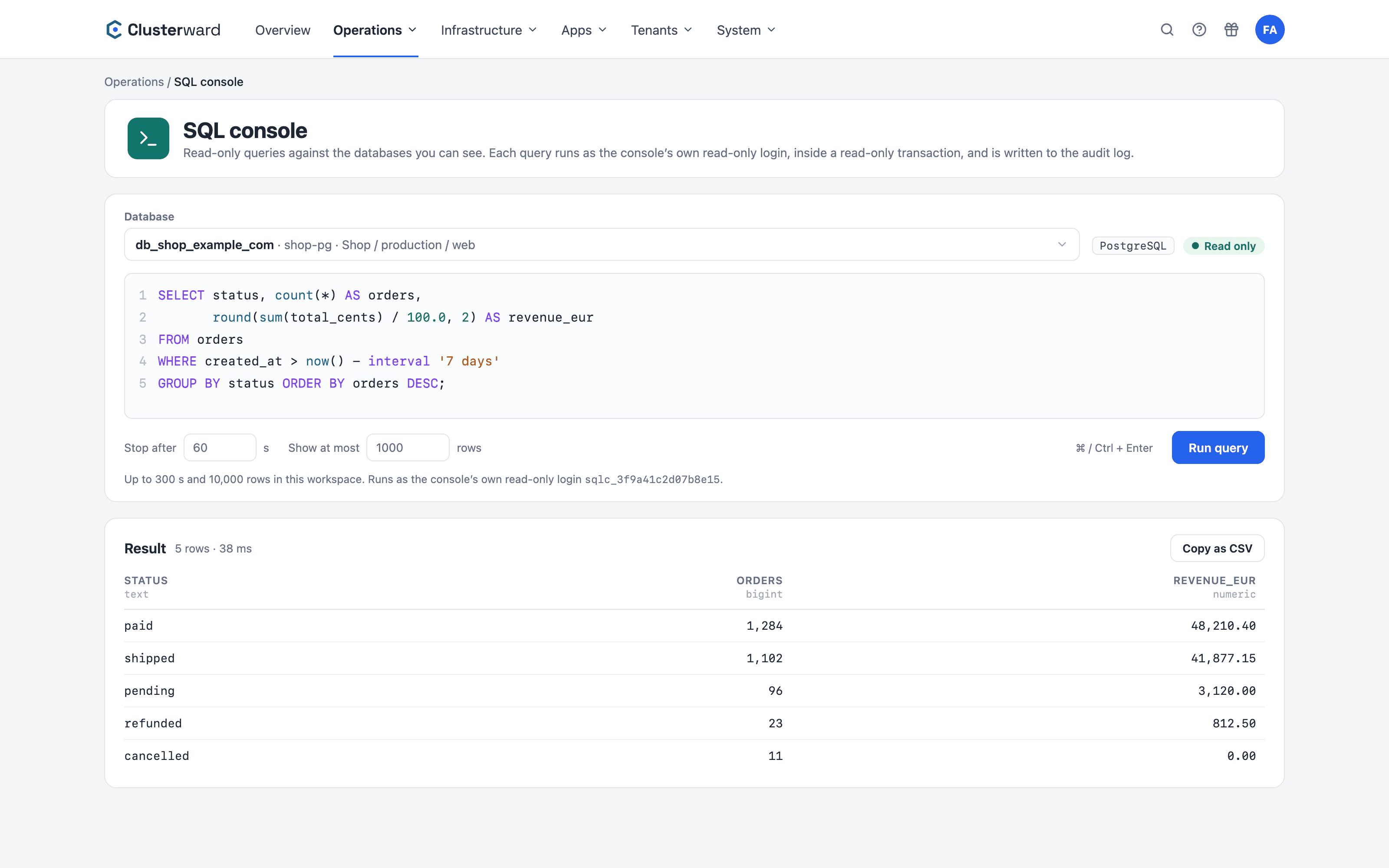
A query in the SQL console of the Clusterward cockpit, with its result
SQL-Konsole im Clusterward-Cockpit: Datenbank gewählt, Abfrage und Ergebnis (vereinfachte Darstellung)
Illustration: a simplified view. The product shows more details and options.
In short

What the SQL console is

The SQL console is a query window in the Clusterward cockpit for PostgreSQL and MySQL databases on Scaleway. It runs one statement per query, with its own read-only login and inside a read-only transaction, and shows at most 1,000 rows within 60 seconds. A permission of its own decides who may use it; every query goes into the audit log.

At a glance

Databases
PostgreSQL and MySQL on Scaleway, on the private network
Access
Its own read-only login per database, read-only transaction
Limits
60 seconds and 1,000 rows per query, adjustable
Evidence
Every query in the audit log, never a result value
Permissions
A permission of its own, scoped to applications
Setup
None – the runner starts with the first query
How it works

From question to answer

  1. 01

    Pick a database

    The list shows only databases you could also open on their own page – with application, environment and service.

  2. 02

    Write the query

    One statement, run with ⌘ / Ctrl + Enter. Time and rows are set right next to it.

  3. 03

    Read the result

    Columns with their types, row count and duration. Copied as CSV with one click.

  4. 04

    Evidence

    Text, database, row count and duration are in the audit log – with name and time.

What’s included

What the SQL console covers

Four layers make sure it only reads – each one is enough on its own.

Its own read-only login

A login of its own per database with the Read level. The console never uses the application’s login.

Read-only transaction

Every query runs in a transaction that may only read and is always rolled back. UPDATE, DELETE or CREATE end with an error.

One statement

No chained statements and no client commands such as \d or \!: the console talks to the database through a driver, not through a command-line client.

Time and row limits

60 seconds and 1,000 rows per query, adjustable up to the ceiling your workspace sets.

Audit log

Query text, database, row count and duration, with person and time. Result values are never stored.

Permissions per application

A permission of its own, “Operations”. Anyone limited to applications sees only their databases and those of their customers.

Straight from the database

On the instance page, ⋯ → “Query data” opens the console with the database already selected.

Copy as CSV

The result on the clipboard with one click, for a spreadsheet, a ticket or a follow-up question.

No tunnel

The database stays on the private network. No port-forward, no bastion, no open port.

Standards, not home-made

How the query reaches the database

  • Private network

    The databases sit on the cluster’s private network and have no public endpoint.

  • Runner in the cluster

    The first query starts a small query runner in the cluster. After that it answers in a fraction of a second.

  • Through the Kubernetes API

    Clusterward reaches the runner through the Kubernetes API. Nothing is open outside the cluster.

  • Driver, not command line

    PostgreSQL and MySQL are addressed through their drivers, results are read row by row.

What changes

Database access with and without Clusterward

Facts

Defaults and ceilings

The default applies per query. Your workspace sets the ceiling, up to the fixed maximum.

WhatPer queryWorkspace ceiling
Run time60 seconds300 s, at most 600 s
Rows1,00010,000, at most 50,000
Statementsoneone
Lengthup to 20,000 charactersfixed
DatabasesPostgreSQL, MySQLinstances attached to a cluster
Further reading

The SQL console in context

The console queries the databases Clusterward creates for your services. How they come about, who may do what and what an auditor wants to see is described in Managed databases, Security & access and Audit & NIS2.

When read access to production data makes sense and how to build it without Clusterward is covered in the article Looking at production data without sharing the password.

Related pages

What goes with it

Managed databases

PostgreSQL and MySQL per service, on the private network only.

Go to Databases

Security & access

Roles per area, mandatory 2FA and the audit log.

Go to Security
FAQ

Frequently asked questions about the SQL console

  • No. It uses its own login with read rights, runs every query in a read-only transaction that is rolled back afterwards, accepts only one statement and no client commands. Each of these layers prevents writes on its own.

Your question isn’t here? Write to us – we usually reply the same working day.

Ask a question

The SQL console in the demo

We query a sample database, show the entry in the audit log and how a role limits access to the databases of one application.