
Clusterward
S3 backups

S3 backup with Object Lock: a locked copy of your buckets every night

Versioning keeps old states in the same bucket, in the same project, with the same key – that is not a backup. Clusterward copies every bucket each night into a backup bucket with Object Lock, ideally in a Scaleway project of its own and another region. Each night is a restore point, kept 30 days by default and tested every month.

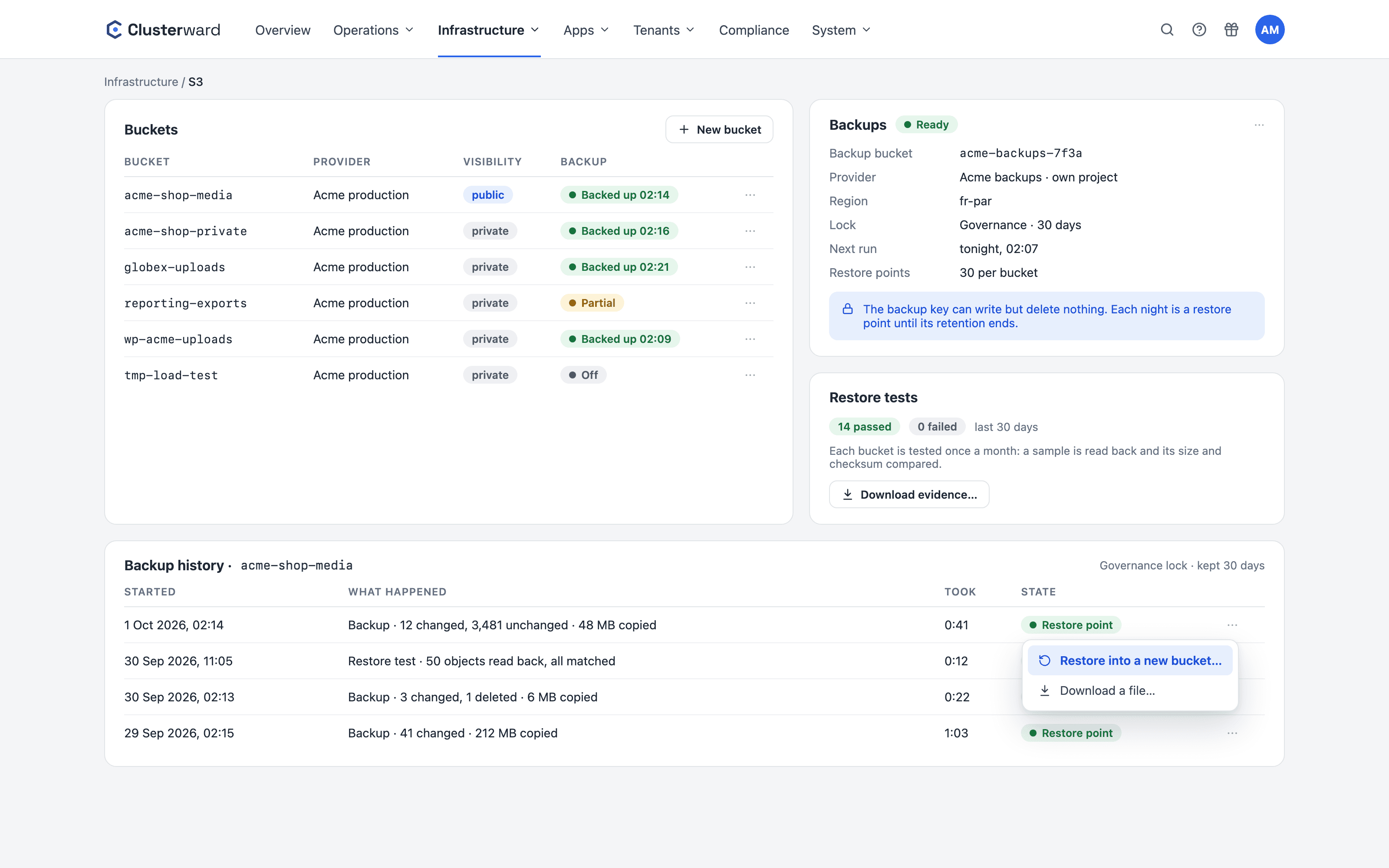
The Backups card on the S3 page in the Clusterward cockpit
The S3 page with the Backups card and backup history in the Clusterward cockpit (simplified illustration)
Illustration: a simplified view. The product shows more details and options.
In short

What are S3 backups in Clusterward?

An S3 backup is a nightly copy of every bucket Clusterward manages into a backup bucket with Object Lock. You set the backup bucket up once on the S3 page; after that backups are on for every bucket – including buckets added later. Only what changed is copied, and deleted objects stay restorable for the retention period.

At a glance

Schedule
every night, only changes
Retention
7–365 days, default 30
Lock
Object Lock: governance or compliance
Target
a project of its own, a region you choose
Restore
a new bucket or one file
Tests
monthly, evidence as CSV
Plan
included in every plan
The difference

Why versioning is not a backup

Delete the bucket, lose the key or lose the region, and the versions go with it. A backup lives somewhere else, is kept for a fixed time and cannot be removed by the thing it protects against. That is exactly what an ISO 27001 audit asks under A.8.13.

AspectVersioningS3 backup in Clusterward
Locationthe same bucket, the same projecta backup bucket of its own, ideally another project and region
Who can deleteanyone with the bucket’s keynobody with the backup key – it has no delete right
Region failsoriginal and versions gonethe copy in the other region
Retentionuntil someone cleans upa fixed period, 7 to 365 days
Evidencenonerestore tests and a CSV for the audit
How it works

Set up in four steps

  1. 01

    Connect a backup project

    Register a Scaleway project of its own as an S3 provider. Its key needs IAM Manager rights once.

  2. 02

    Create the target

    S3 → Backups → “Set up backups”: provider, region, bucket name, lock and days. No region is preselected – you decide.

  3. 03

    Clusterward checks

    A bucket with Object Lock and versioning, retention, clean-up rules, a backup key of its own and a test object – then “Ready”.

  4. 04

    A point every night

    Every bucket gets its run; it ends with a restore point listing every object of that night.

Object Lock

Governance or compliance: how firm the lock is

Both modes lock every copy until its retention ends. They differ in whether an administrator of the backup project can remove a copy earlier. “Change retention…” changes the days and switches governance to compliance; compliance can only be lengthened, never shortened or turned back.

LockWho can delete a locked copyWhen to pick it
Governancenobody with the nightly backup key; an administrator of the backup project in the Scaleway consolethe default – lets you honour a deletion request in the backups too
Compliancenobody – not Clusterward, not an administrator, not Scaleway support – until the retention endswhen a rule demands copies that cannot be removed; deletion requests then take effect only at expiry
In operation

What happens every night

Only changes

Copied is what is new or changed in size or checksum. Unchanged objects refer to earlier nights.

Deleted stays recoverable

An object deleted from the bucket stays restorable for the retention period.

A backup key without delete rights

Clusterward creates the nightly key for this alone; it can write, but delete nothing.

Large files in parts

Objects up to the 5 TB S3 limit: over 2 GiB in parts, each part retried on its own.

Alerts on gaps

“Bucket backup failed” on an error, “Bucket backup missing” when a bucket had no good backup for 36 hours.

A warning for the same region

If buckets sit in the backup’s region or project, the card names them – one outage would hit both.

Restore

Restore: a new bucket or a single file

“Backup history…” on the bucket lists every night as a restore point. “Restore into a new bucket…” copies that night into a new, private bucket – the running bucket is never touched. Every object comes back at exactly that night’s state, with its content type and metadata; just one folder if you like.

Most of the time it is one deleted file: “Download a file…” searches a night’s files by name or path and downloads one through a link that is valid for five minutes.

Restore

Target
a new private bucket, same provider
Name
<bucket>-r<yyyymmdd>, changeable
Scope
the whole bucket or a prefix
Single file
search + a 5-minute link
Notification
“Bucket restore finished/failed”
For the audit

Restore tests and evidence

A backup only counts once a restore has worked. Once a month Clusterward reads a sample back from every bucket’s latest restore point and compares size and, where present, checksum. A test only reads and writes nowhere; “Test restore” starts one right away.

WhatHow
Samplethe newest and the largest object (up to 100 MiB) plus random ones – up to 50 objects or 500 MiB
Checksize must match, checksum where present
Failure“Bucket restore test failed” to your channels
Evidence“Download evidence…”: a CSV of every backup, restore and test, up to 400 days
Recordevery download is in the audit log
What changes

Bucket backup with and without Clusterward

Further reading

S3 backups in context

How buckets, providers and keys are created is covered under Object Storage. Clusterward backs up databases, disks and earlier versions in other ways – the overview is Backups & recovery.

The backup evidence is also one of the reports of the compliance page, which shows bucket backups and restore tests as ISO 27001 checks.

Related pages

What goes with it

Backups & recovery

Databases, disks, buckets and earlier versions at a glance.

Go to Backups
FAQ

Frequently asked questions about S3 backups

  • No. Versions sit in the same bucket, in the same project and are reachable with the same key. If the bucket is deleted, the key misused or the region fails, they are gone too. A backup is kept apart, locked and has a fixed retention.

Your question isn’t here? Write to us – we usually reply the same working day.

Ask a question

S3 backups in the demo

We set up a backup target with Object Lock, restore a night into a new bucket and download the evidence for your audit.