
Clusterward
Volumes & snapshots

Persistent volumes with snapshots that come before deletion

A service gets volumes with a mount path, size and storage class. Clusterward creates the claims, schedules snapshots with retention and deletes data only after a confirmed snapshot.

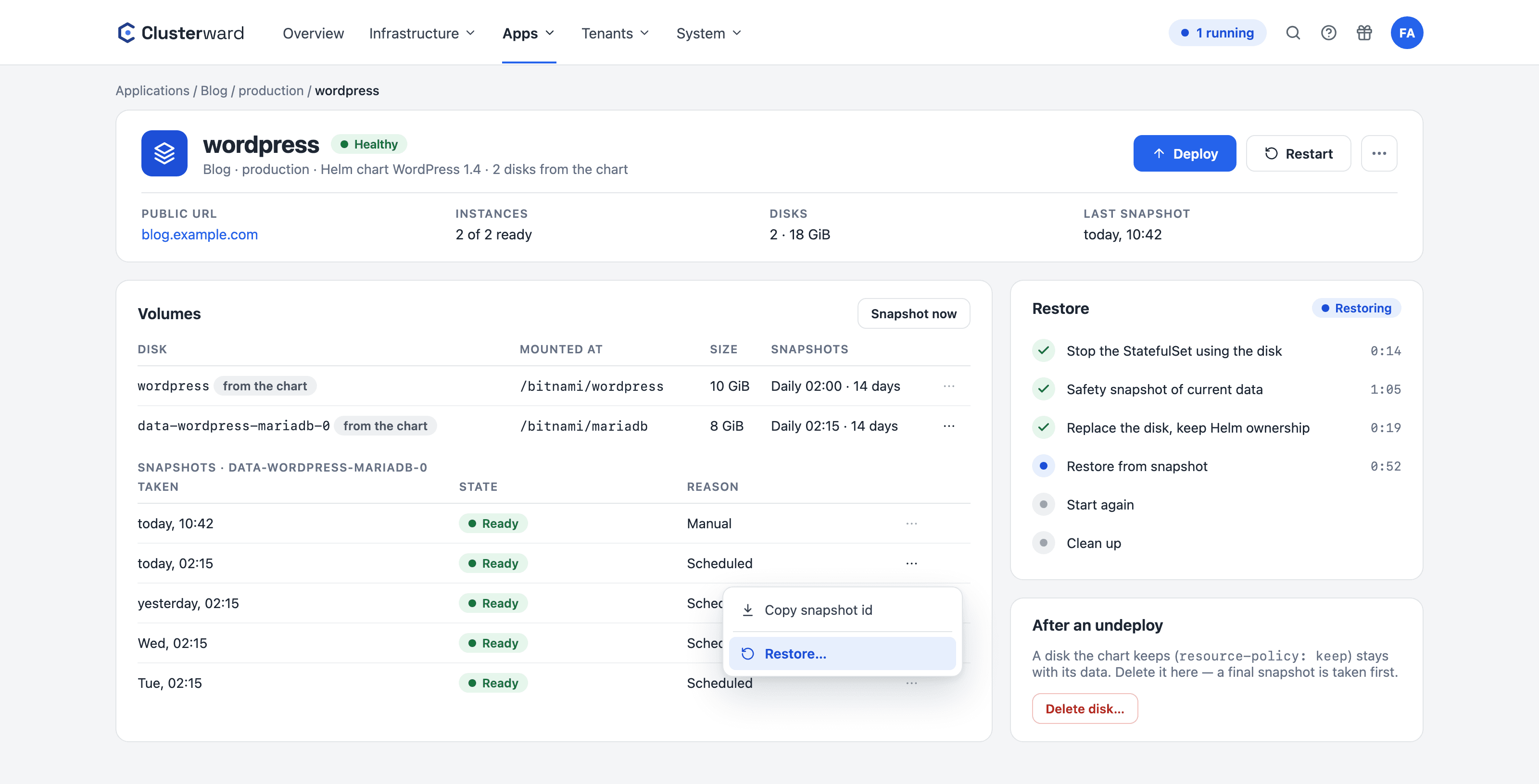
Helm chart disks with snapshots and restore in the Clusterward Cockpit
Disks of a Helm chart with snapshots and restore in the Clusterward cockpit
Illustration: a simplified view. The product shows more details and options.
In brief

What volumes and snapshots are in Clusterward

A volume in Clusterward is a persistent disk belonging to a service: a PersistentVolumeClaim on Scaleway Block Storage with a name, mount path, size and storage class, created before the deployment and mounted into the container. Snapshots are Scaleway Block Storage snapshots of the disk behind the claim, taken on a schedule with retention in days, or once before deletion. Undeploy leaves volumes untouched, a service with volumes cannot be deleted, and the only way to get rid of data leads through a confirmed snapshot.

At a glance

Disk
One claim per volume on Scaleway Block Storage
Access
ReadWriteOnce, exactly one instance
Snapshots
Schedule with retention, plus a snapshot before deletion
Growth
Size only goes up, class stays
Protection
Undeploy and service deletion leave data in place
Restore
One click in the cockpit, with a backup first
Helm charts
Chart disks with snapshots and restore
How it works

From volume to protected disk

  1. 01

    Define the volume

    Name, mount path, size, storage class and, optionally, the snapshot schedule.

  2. 02

    Create the claim

    During a deployment, the claim is created before the Deployment and mounted.

  3. 03

    Schedule snapshots

    An hourly run creates due snapshots of deployed services.

  4. 04

    Retain

    Expired snapshots are only deleted from Clusterward’s own list.

  5. 05

    Delete with a safety net

    First a snapshot, which must be ready, then the claim, then the volume.

What’s included

What volumes in Clusterward come with

The rules you learn the hard way with block storage on Kubernetes are built in here.

One claim per volume

Each volume becomes its own claim, named after the release and volume, created before the deployment. Mount paths must not overlap, and names are unique.

Recreate instead of rolling

A Deployment with volumes uses the Recreate strategy, because a rolling update gets stuck on a single-attach disk. Scaling is pinned to one instance.

Scheduled snapshots

One schedule and one retention period in days per volume. Snapshots are created as Scaleway Block Storage snapshots, appear in the console and can be restored with a click in the cockpit.

Grow only

A volume’s size can increase, never decrease, and the storage class stays fixed. Removing a volume from the list is refused.

Data survives deploys

Undeploy doesn’t touch any claim. A service with volumes cannot be deleted until its data has been explicitly removed.

Delete only with a snapshot

The only way: delete volume data, confirmed by typing, while the service is not deployed. A snapshot must be ready before the claim goes.

Disks from Helm charts

The claims a chart creates itself – including those of a database in a StatefulSet – appear on the Volumes card of the Helm service, marked “from the chart”, with mount path and size. Snapshots immediately or on a schedule.

Restore without disturbing Helm

When restoring, Clusterward stops every Deployment and StatefulSet that uses the disk, backs up the current state and recreates the claim with Helm’s metadata. The next upgrade still recognizes it as its own.

Clean up after undeploy

A disk the chart leaves behind on uninstall stays visible and can be deleted – with a final snapshot first.

Standards, not DIY

On Scaleway Block Storage

  • Block Storage

    Disks and snapshots via the Scaleway API, per zone.

  • CSI

    The disk is resolved via PVC, PV and CSI handle.

  • Reclaim policy

    Deleting the claim leaves the disk to the storage class.

  • fsGroup

    Optional per volume, so non-root containers can write.

What changes

Volumes with and without Clusterward

Facts

Rules Clusterward enforces

Each rule corresponds to a mistake that would otherwise cost data on block storage.

RuleBehavior
ScalingFixed, exactly one instance, no autoscaler
StrategyRecreate instead of RollingUpdate
SizeIncrease only
Storage classImmutable after creation
Removing a volumeOnly via “Delete volume data” with a snapshot
UndeployClaims remain
Snapshot deletionOnly entries from Clusterward’s list
Helm chart disksSnapshots and restore as with your own volumes; the chart determines the size
Snapshot statusShown as ready about a minute after completion at Scaleway
Further reading

Volumes in context

Volumes belong to the service and are created or enlarged with every deployment. Snapshots require the Block Storage permission set in the cluster’s provisioning profile; see Cluster provisioning.

Environment building blocks of a pipeline carry volumes too; their rollback backs up the data before tearing anything down, as described under Tenant pipelines.

Which disks a Helm chart creates and what helm uninstall does with them is explained in the article Helm charts and their disks.

Related features

What goes with it

Deployments

Git, container image or Helm chart – rolled out with a health check.

Go to Deployments
FAQ

Frequently asked questions about volumes & snapshots

  • Anything that expects files on a disk: a CMS’s upload folders, search indexes, caches, small databases in containers. For relational data, a managed database is the better choice; volumes cover the rest.

Can’t find your question? Write to us – we usually reply on the same business day.

Ask a question

Volumes in the demo

We attach a volume to a service, schedule snapshots and show the protected deletion path.