
Who it’s for
SaaS vendors, agencies and platform operators who want to stay on Scaleway – without their own platform team.
More about our solutionsClusterward is the control plane for Scaleway: provision Kapsule clusters, deploy SaaS applications from Git, a container image or a Helm chart, and onboard new customers via pipeline – with database, bucket, domain and certificate. One cockpit, your Scaleway project.
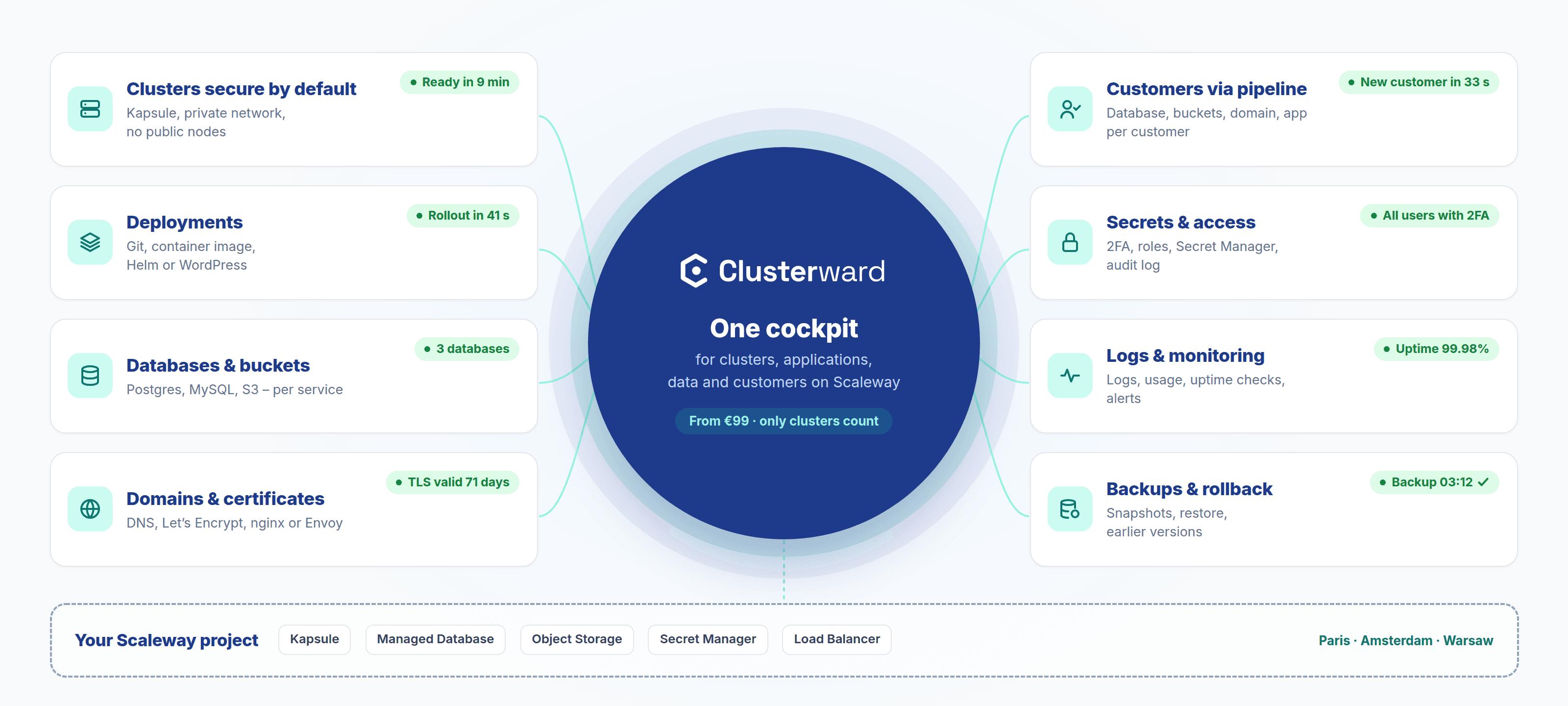
Clusterward is the control plane for Scaleway: provision Kubernetes clusters, databases, Object Storage, DNS and certificates from one cockpit, deploy applications from Git, a container image or a Helm chart, and onboard new customers via pipeline – all in your own Scaleway project.
SaaS vendors, agencies and platform operators who want to stay on Scaleway – without their own platform team.
More about our solutionsKapsule, managed Postgres & MySQL, Object Storage, Cloudflare DNS, cert-manager, Helm – controlled, not abstracted.
All featuresQovery, Heroku and DIY scripting. All resources stay in your project, even after you cancel.
See the comparisonsBitKollegen GmbH from Hannover. Clusterward runs as SaaS: your own workspace on your own subdomain, no installation required.
More about the companyClusterward drives the tools your team already uses. Everything it creates is visible in kubectl, the Scaleway console and Cloudflare – and you can keep running it without Clusterward at any time.
Managed Kubernetes with Private Network, Public Gateway and nodes without public IPs.
Deployments as standard objects, Helm charts from the template library, no proprietary format.
Scaleway RDB with a private endpoint, one database and role per service.
S3-compatible buckets with their own IAM key and bucket policy per application.
Let's Encrypt per host or a managed wildcard certificate for all subdomains.
DNS records created automatically, proxy switchable per host, real client addresses in the cluster.
Container builds in the cluster or on GitHub’s runners, with the image verified in the registry before rollout.
Ingress or Gateway API; timeouts, rate limits, basic auth and CORS per service.
That’s what the first onboarding on clusterward.app looked like: five steps, each individually retryable, each with its own way back. No script, no ticket, no weekend.
What the log shows is a real run: the pipeline creates every resource in your Scaleway project, records the IDs immediately and can therefore pick up exactly where it failed – or tear everything down again in reverse order.
How tenant pipelines workEvery feature is a deliberate switch. Nothing touches your infrastructure until you approve it.
From the repository to a reachable address with a certificate.
Git, container image or Helm chart. Built with Kaniko in the cluster or with GitHub Actions, rolled out with a health check, restarted without a rebuild. Environment variables encrypted, “Restart pending” visible.
API tokens with role, application scope and expiry date. Deploys from GitHub Actions, every action in the audit log under the token’s name.
ingress-nginx or Envoy Gateway; timeouts, rate limits, CORS and basic auth per service. Controller switches without downtime, real client IP.
Register Cloudflare zones and create records automatically – but only ever touch its own. Let's Encrypt per host or a managed wildcard certificate for all subdomains.
Everything that has to last – separated per service and backed up.
Postgres and MySQL, private connectivity only. One database with its own role per service, read-only users for BI, imports from other systems – and a dump in the bucket before every drop.
Buckets on Scaleway Object Storage with their own IAM key per application, bucket policies and public or private visibility. Import from third-party S3 buckets, archive on offboarding – never a blind deletion.
Persistent volumes per service on Scaleway Block Storage, scheduled snapshots with retention. Data survives every deploy; a volume disappears only after a confirmed snapshot.
Back up databases, volumes and chart disks; bring back earlier versions with a click.
A cluster that is secure from day one, and a clear view of it in daily operations.
Secure by default: Private Network, Public Gateway, nodes without public IPs, API access only from your CIDR. Ingress controller, cert-manager and metrics are installed right along with it.
Configuration check between cockpit and cluster, Kubernetes and add-on upgrades from the cockpit, live status of nodes and pods, notifications via webhook, Slack, Teams or email – once per event.
Logs from all instances, 30 days of usage and uptime checks with alerting – without an agent in the cluster.
Failed deployments, sites that are down and expiring certificates via Slack, Teams, webhook or email.
Onboard and offboard customers by pipeline, with tightly limited access.
Onboarding as building blocks: plug database, bucket, domain and workload together in the designer, with values flowing through the variable bus. Retry, rollback and offboarding with backup included.
Mandatory 2FA, roles with application scope, secrets write-only and never in logs, every change in the audit log under a real name, IP allowlist per workspace.
Write-only secrets, stored in the Scaleway Secret Manager if you wish. Rotations are detected and the service restarts. External Secrets Operator as an add-on.
Store an IAM key as a profile, fill in the wizard, and your Kapsule cluster comes up securely configured.
Repository, build and environment – the namespace is set once and stays stable.
Add a domain, create a database in one step, follow the rollout with its health check.
Build a pipeline in the designer, enter customer data, let preflight check for collisions, start the run.
Configuration check, Kubernetes and add-on upgrades, backups with restore, notifications via webhook or email.
Qovery charges $2,999 per month for three clusters and $399 for each additional one. Clusterward costs €299 for ten clusters – a tenth of the price for three times as many, with unlimited users instead of twenty.
See the detailed comparison with QoveryYou get your own cockpit on a subdomain. No other workspace sees what’s inside it – and whatever you provision lives in your Scaleway project.
Three plans, tiered by number of clusters only: 2, 10 or unlimited. Applications, tenants and users are unlimited on every plan. Cancel monthly, no setup fee – you pay for Scaleway resources directly.
Up to 2 clusters
Up to 10 clusters
Unlimited clusters
Anything else? Write to us or book a demo.
Can’t find your question? Write to us – we usually reply on the same business day.
Ask a questionFrom an empty Scaleway project to your first deployment in 30 minutes – we’ll show you live, using your own use case.