Clusterward
Deployments

Deployments on Scaleway: from Git, image or chart into the cluster

Clusterward builds your image, verifies it in the registry and rolls it out with a health check on your Kapsule cluster. Environment variables are stored encrypted in the cockpit, and a restart activates them without a new build.

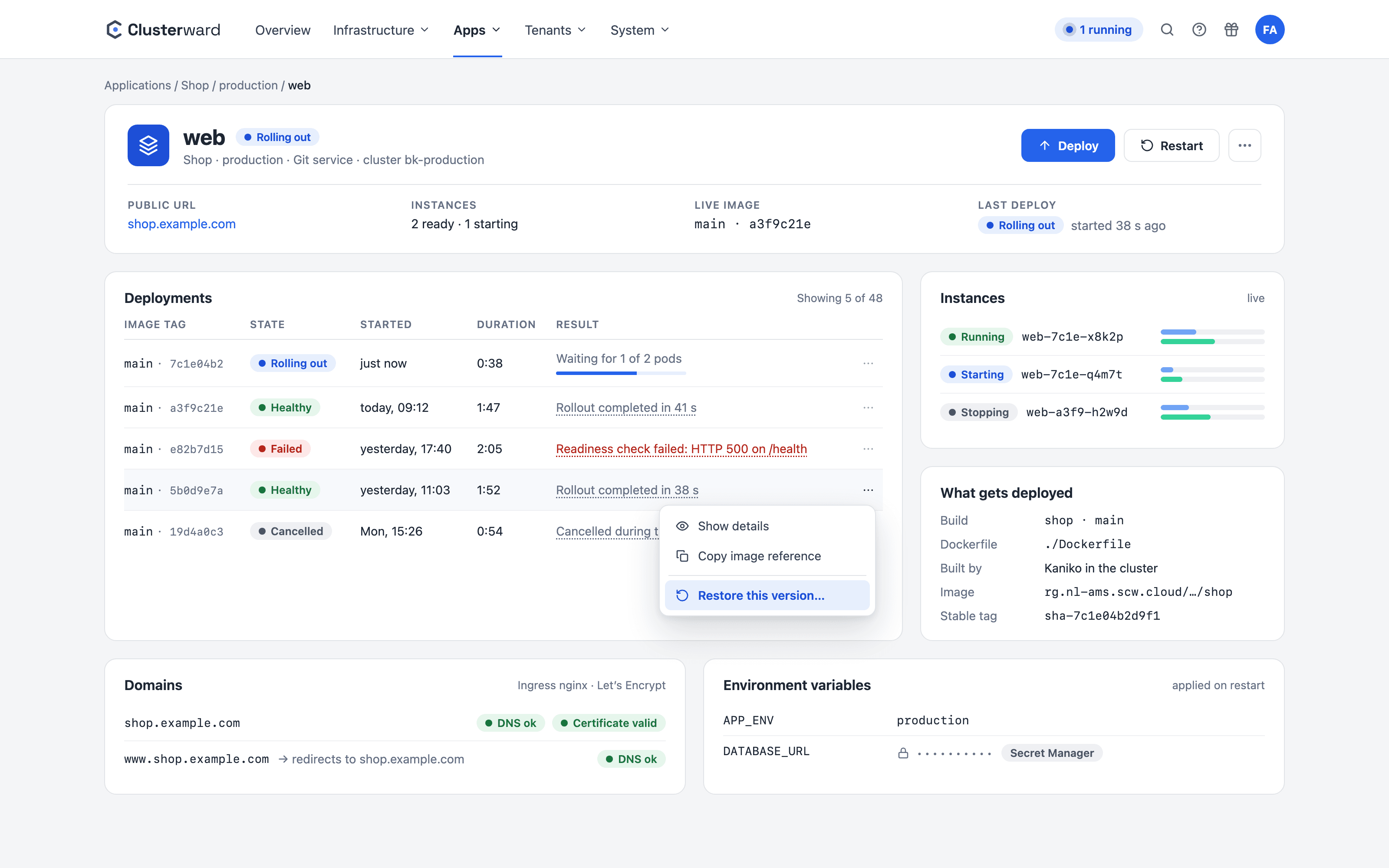
Service page in the Clusterward Cockpit
Simplified view of a service page in the Clusterward cockpit: rollout in progress, deploy history with “Restore this version…”, instances, build, domains and secrets
Illustration: a simplified view. The product shows more details and options.
In brief

What a deployment is in Clusterward

A deployment in Clusterward is the rollout of a service to an environment on one of your Scaleway Kapsule clusters. A service is either an application from Git (Clusterward builds the image from your repository), a ready-made container image from your registry or a Helm chart from the template library. From the service, Clusterward generates the Deployment, the Kubernetes Service, an ingress with TLS, the autoscaler and the secret holding the environment variables, and writes them to the cluster via server-side apply. Deployments run in the background, and their progress is visible in the cockpit at any time.

At a glance

Sources
Git repository, container image, Helm chart
Build
Kaniko in the cluster or GitHub Actions
Rollout
Server-side apply, health check with a configurable timeout
Configuration
Encrypted environment variables, restart without rebuild
Scaling
Fixed replicas or autoscaler based on CPU load
Removal
Undeploy removes all objects, data stays
Versions
Exact image by digest, earlier versions restorable
How it works

From commit to running pod

  1. 01

    Choose the build

    Branch, Dockerfile and image name belong to the application’s build, not to the service.

  2. 02

    Build the image

    Kaniko builds in the cluster and pushes to the cluster’s registry with a key that may only use the registry, or a GitHub Actions workflow takes over the build.

  3. 03

    Verify the image

    Before the rollout, Clusterward asks the registry whether the tag really exists.

  4. 04

    Roll out

    Deployment, Service, ingress, secret and autoscaler are created or updated.

  5. 05

    Report healthy

    Only once the pods are ready is the rollout considered successful.

What’s included

What deployments in Clusterward bring

Everything a team otherwise maintains in its own pipelines, manifests and scripts is built into the cockpit.

Build and roll out

From Git, a registry or a chart – always exactly the image you mean.

  • Git deployments with their own build

    A service references a build of the application: branch, Dockerfile, image name and tag. Private repositories are cloned with a token stored encrypted.

  • Container and Helm services

    Ready-made images from the registry or Helm charts from the central template library with a pinned version. Charts are versioned internally, without a Git connection.

  • Deploy from CI via API token

    GitHub Actions or any script triggers deploy and restart via bearer token and polls the status. The token carries a role, an application scope and an expiry date.

  • Exact image instead of a moving tag

    Before the rollout, Clusterward asks the registry what the tag currently points to and rolls out exactly that image by digest. New builds additionally get a fixed tag sha-<Commit>.

Configuration and secrets

Change values without rebuilding, and without anyone reading them back.

  • Environment variables, encrypted

    Values are stored AES-encrypted in the cockpit and mounted as a Kubernetes Secret on deployment. Multi-line values such as PEM keys stay intact.

  • Secrets instead of plain text

    Secrets can no longer be read once saved; Helm charts get passwords as ${secret.NAME}. Rotations from Secret Manager restart the service on request.

  • Restart without rebuild

    You activate changed variables with a restart: Clusterward applies the current image with the new configuration, without building the image again.

  • Networking per service

    Timeouts, retries, rate limits, CORS and basic auth for ingress-nginx or Envoy Gateway, each shown next to the controller’s default value.

While it runs

See what is running, and go straight to the cause when something fails.

  • Resources and autoscaling

    CPU and memory requests with optional limits, a fixed replica count or a HorizontalPodAutoscaler with a CPU target between minimum and maximum.

  • Instances and logs live

    The service page shows the running pods with their utilization, the log of each pod and the history of all deployments with error text. The log viewer merges all instances by time, searches, filters errors and shows the previous run of a crashed container.

  • From failure straight to the logs

    If a rollout fails, the link in the activity feed and in the notification leads straight to the logs – for a crash, to the previous run, where the cause is.

Roll back and protect

Bring back an earlier version without losing configuration or data.

  • Restore an earlier version

    “Restore this version…” in the deploy history rolls out exactly the image of an earlier healthy version – for Helm, the chart version and values. Configuration and data stay as they are.

  • Restart keeps the running image

    A restart applies the current configuration to the image that is currently running and never undoes a restore. Deploy fetches the newest image.

  • Helm services with backed-up disks

    The disks a chart creates are listed on the Helm service: with scheduled snapshots and restore.

Standards, not DIY

Standard Kubernetes, no special paths

  • Kaniko

    Image builds run as a job in the cluster, without a Docker daemon and without a build server.

  • GitHub Actions

    Alternatively, Clusterward starts a workflow_dispatch and waits for the result.

  • Server-side apply

    Objects are written declaratively; conflicts stay visible instead of being overwritten.

  • Helm

    Helm services are installed and upgraded with the bundled Helm CLI.

What changes

Deployments with and without Clusterward

Facts

Three service types, one flow

A service’s source only determines where the image comes from. Ingress, TLS, secret and rollout are the same for all of them.

AttributeGitContainerHelm
SourceRepository and DockerfileImage from the registryChart from the template library
BuildKaniko or GitHub ActionsNoneNone
Image tagFrom the buildPinned on the serviceFrom the chart
Environment variablesEncrypted secretEncrypted secretValues of the chart version
Restart without rebuildYesYesVia upgrade
AutoscalingFixed or HPAFixed or HPAAs defined by the chart
Further reading

How deployments fit in

A deployment needs a cluster, a database and a hostname. Clusterward creates the cluster secure by default during Cluster provisioning, the database is created with one click on the service page via Managed databases, and the host gets its record and certificate via DNS & certificates.

If you roll out the same stack for many customers, you describe it once as a pipeline. The Tenant pipelines page shows how that works. All features are included in every plan; billing is by cluster only, see Pricing.

How to get back databases, volumes and earlier versions is shown in Backups & recovery.

Logs of all instances, utilization over 30 days and uptime checks on the service are described in Logs & monitoring.

Related features

What goes with it

FAQ

Frequently asked questions about deployments

  • Three: an application from Git, whose image Clusterward builds from the repository; a ready-made container image from your Scaleway registry; or a Helm chart from the template library. The type is fixed at creation, but a container service can later be converted into a Git application with a build, without the cluster objects being recreated.

Can’t find your question? Write to us – we usually reply on the same business day.

Ask a question

See a deployment live

In the demo, we roll out an application from your repository to a Kapsule cluster together, including domain, certificate and database.