Clusterward
Product

Kubernetes control plane for Scaleway: the whole picture on one page

Clusterward is the Kubernetes control plane between your code, your customers and your Scaleway project. This page shows how clusters, applications, data, networking, customers and security fit together – and why one cockpit for everything means less work than six tools.

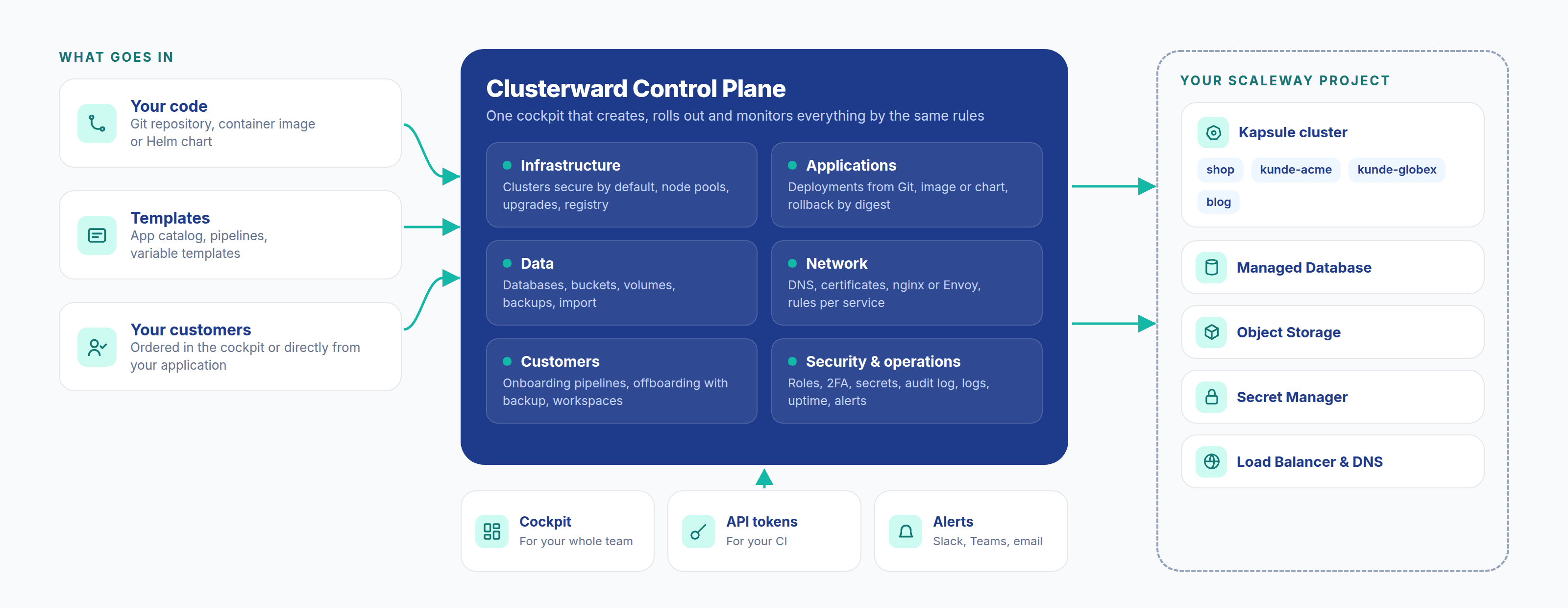
Overview: code, templates and customers flow through the Clusterward Control Plane with six areas into your Scaleway project with Kapsule, database, Object Storage, Secret Manager and Load Balancer
How it all fits together: code, templates and customers pass through the Clusterward Control Plane into your Scaleway project
In brief

What is a Kubernetes control plane?

A Kubernetes control plane, in Clusterward’s sense, is the layer above your clusters that defines how applications, databases, domains, secrets and customers come into being, and then operates them. You describe what should run; Clusterward creates it in your Scaleway project, rolls it out, backs it up and alerts you when something goes wrong. Scaleway runs Kubernetes’ own control plane.

The difference from a console: a console shows individual services. A control plane knows how things relate – which database belongs to which service, which domain points to which cluster, which customer owns which resources – and acts on that, when creating as well as when deleting.

At a glance

Clusters
Scaleway Kapsule in Paris, Amsterdam, Warsaw
Applications
Git, container image, Helm chart, app catalog
Data
PostgreSQL, MySQL, Object Storage, volumes, read-only SQL console
Customers
Onboarding pipelines, offboarding with backup
Security
Mandatory 2FA, roles, secrets, audit log
Operations
Logs, usage, uptime checks, alerts
Price
From €99 per month, only clusters count
The path

How do you get from an empty Scaleway project to a live customer?

  1. 01

    Connect your project

    One IAM key per Scaleway project, checked before it is saved.

  2. 02

    Create the cluster

    Kapsule in a private network, nodes without public IPs, ingress and certificates.

  3. 03

    Roll out an application

    From Git, an image, a Helm chart or the app catalog, with a database and domain.

  4. 04

    Create customers

    Via pipeline: database, buckets, domain and workload per customer in a single run.

  5. 05

    Operate

    Logs, alerts, backups, upgrades and rollback – in the same cockpit.

Six areas, one cockpit

Which areas does Clusterward cover?

Each area is useful on its own. The value comes from all of them knowing the same objects.

Infrastructure

Kapsule clusters are created secure by default: private network, gateway, nodes without public IPs, API server reachable only from your addresses. You update node pools, the Kubernetes version and add-ons such as the ingress controller and cert-manager from the cockpit; every cluster has its own container registry.

Applications

A service comes from a Git repository with a build in the cluster or via GitHub Actions, from a ready-made image or as a Helm chart. Every rollout is confirmed by a health check and pinned by digest, and every earlier version can be brought back. WordPress comes ready to go from the app catalog.

Data

Managed PostgreSQL and MySQL in a private network with one database per service, buckets with their own key, persistent volumes. Backups, snapshots and restores alongside the running database are part of it, as is importing existing databases and buckets. The SQL console queries them read-only, with every query in the audit log.

Network

Every host gets a DNS record and a certificate – automatically with Cloudflare, and via wildcard for many subdomains. Ingress runs on nginx or Envoy Gateway, with timeouts, rate limits, CORS and basic auth per service, and a controller switch without downtime.

Customers

For SaaS vendors, every customer becomes a pipeline run: database, buckets, domain and application from a template, live in minutes. Your own application can order customers directly. Offboarding backs up first, then tears down in reverse order.

Security & operations

Mandatory 2FA, roles with application scope, API tokens for CI and an audit log of every change. Secrets can’t be read back and, if you wish, are stored in Scaleway Secret Manager. Logs from all instances, usage, uptime checks and alerts show what is happening in operations.

How it connects

How do the areas work together?

An example shows it best. A SaaS vendor gets a new customer. In one run, a tenant pipeline creates a database on the managed database instance, a bucket pair with its own key in Object Storage, a subdomain with record and certificate via DNS & certificates, and rolls out the application for the customer.

The credentials never pass through emails or tickets: the database password and bucket key go via the template straight into the service’s environment, and if you wish as unreadable secrets in Scaleway Secret Manager. Who created what is recorded in the audit log.

In operations, Clusterward knows the same relationships. If the customer’s site goes down, an uptime check reports it, and the link leads to the logs of all instances under Logs & monitoring. If the customer needs an earlier state, the database is restored from a backup alongside the running one, as described under Backups & recovery.

If the customer cancels, everything runs in reverse: database dump and bucket archive first, then the application, domain, buckets and database are removed – exactly the ones created for that customer, and no others. This knowledge of how things relate is the difference between a control plane and a collection of scripts.

Division of responsibilities

Who does what: Scaleway, Clusterward or your team?

Clusterward replaces neither Scaleway nor your developers. It takes over the work in between that otherwise lives in scripts, wikis and people’s heads.

TaskScalewayClusterwardYour team
Kubernetes control planeRuns itUses it–
Clusters, network, registryProvides servicesCreates securely, updatesChooses size and region
Deployments–Builds, rolls out, checks, rolls backWrites the code
Databases, buckets, volumesRuns the servicesCreates per service, backs upDecides about data
DNS and certificatesLoad balancersRecords, certificates, ingressOwns the domains
Creating and tearing down customers–Pipeline, backup before teardownDefines the template
Access and evidenceIAM2FA, roles, audit logAssigns roles
Monitoring–Logs, usage, uptime, alertsResponds to alerts
What changes

Kubernetes operations with and without a control plane

Standards, not DIY

What standards is Clusterward built on?

  • Kubernetes and Helm

    Your applications are ordinary Deployments, Services and Helm releases – readable with any tool.

  • Scaleway services

    Kapsule, Managed Database, Object Storage, Secret Manager and Load Balancer in your own project.

  • Data in the EU

    Data centers in Paris, Amsterdam or Warsaw, with a European provider.

  • No lock-in

    Everything keeps running without Clusterward; you export the configuration as a JSON file.

FAQ

Frequently asked questions about the Kubernetes control plane

  • The console manages individual services. Clusterward knows how they relate: which database, which bucket and which domain belong to which service and customer. That makes possible deployments with health checks, customer pipelines, backups before deletion and an audit log covering everything.

Can’t find your question? Write to us – we usually reply on the same business day.

Ask a question

The whole picture in 30 minutes

In the demo, we connect a Scaleway project, create a cluster, roll out an application and create a customer via pipeline.