Clusterward
Comparison

Clusterward vs. DIY: scripts and wikis versus a control plane

Clusterward’s most common competitor isn’t a product, but your own stack of Terraform, Helm charts, GitHub Actions and a wiki. It’s free to license and expensive in every other way. This comparison shows what DIY delivers, what it costs and where it genuinely is the better choice.

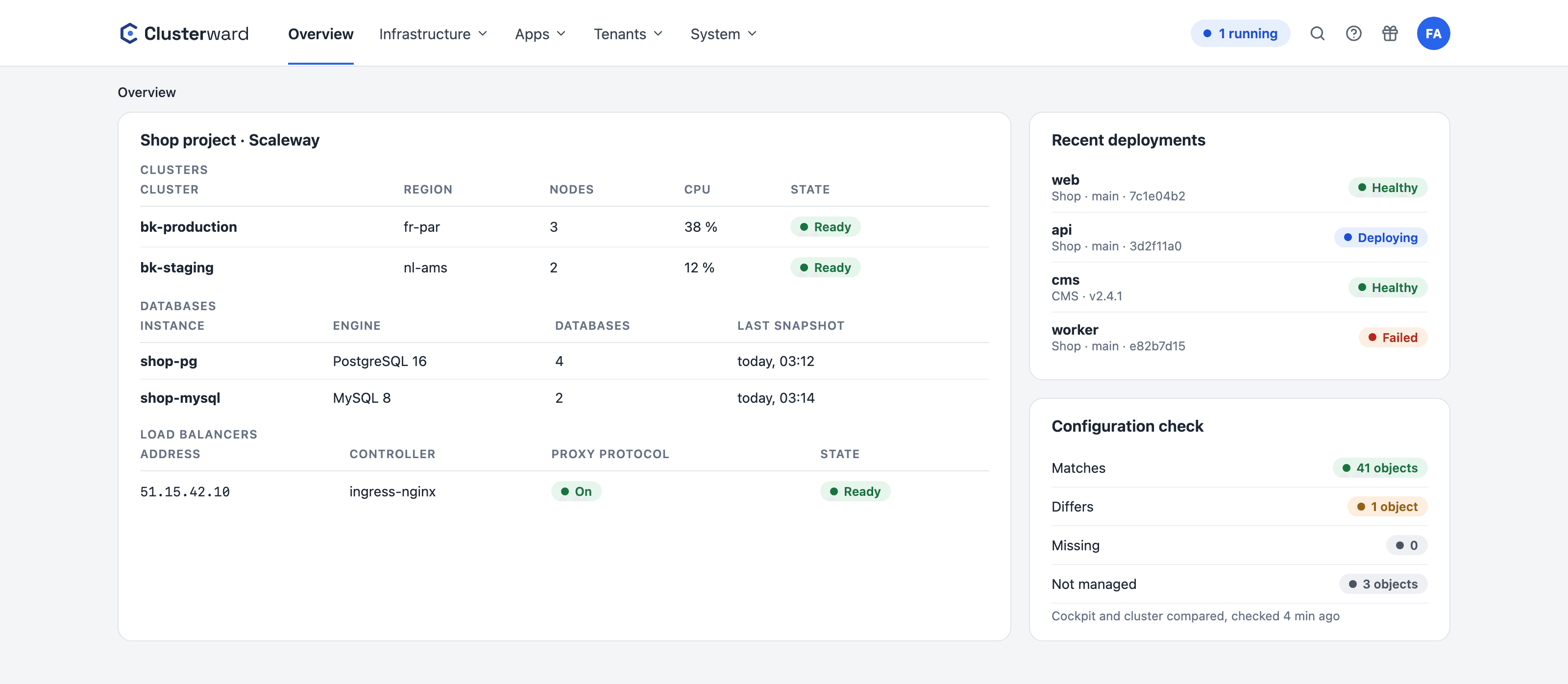
Cockpit dashboard compared with a typical DIY setup: clusters, databases and deployments in one place instead of five tools
Simplified view in the Clusterward cockpit: overview with clusters, databases, deployments and configuration check
Illustration: a simplified view. The product shows more details and options.
In brief

What “DIY” means here

We mean the usual setup of a team that runs Kubernetes on Scaleway itself: Terraform or the console for the cluster, Helm charts or Kustomize for the applications, GitHub Actions for builds and rollouts, cert-manager and external-dns for certificates and records, one script per customer for onboarding, and a wiki for everything that isn’t automated. Each component is open source and good in its own right. The work lies in assembling and maintaining them, and in the knowledge that lives in only a few heads. Clusterward doesn’t replace the components, it replaces the assembly: it renders standard objects onto the same cluster, with checks and safety nets that hardly anyone rebuilds in a DIY setup.

The comparison in numbers

DIY license
€0
Clusterward license
From €99 per month for two clusters
DIY components
Five to eight tools, each with its own version
Clusterward components
One cockpit, standard objects in the cluster
Knowledge
In heads and wikis versus rules in the product
Exit
Standard Kubernetes either way
The honest math

What DIY means in terms of work

No hourly rates, just the tasks. Work out for yourself how many days a year they take up for you, and who does them when that one person is on vacation.

TaskDIYClusterward
Creating a cluster securelyWrite and maintain a Terraform module, hardening as separate stepsWizard, secure by default, repeatable
Deploying an applicationA chart per app, a workflow per repo, secrets by handService with build, variables encrypted, registry check
Database per serviceInstance in the console, CREATE DATABASE via psql, password in the chatOne click on the service page, private instance
Domain and certificateexternal-dns, cert-manager, issuer, keeping an eye on rate limitsEnter the host, record and certificate created automatically, warning 14 days ahead
New customerScript or runbook, known to one personPipeline, orderable from the app, rollback included
Customer cancelsDelete and hope someone made a backup firstDump and archive, then teardown; aborts without a backup
Kubernetes upgradeConsole, read changelogs, check add-onsTarget versions, compatibility, add-on drift in the cockpit
Access and evidenceHand out and collect kubeconfigsRoles, mandatory 2FA, audit log
New colleagueRead the wiki, collect credentials, one to two daysAssign a role, grant access to projects
What changes

What changes day to day

Comparison

Feature by feature

What DIY can do if someone builds it, and what Clusterward brings without anyone having to build it.

FeatureDIYClusterward
Private nodes, API allowlistPossible, if you know howDefault
Registry check before rolloutRarelyAlways
Restart without rebuildVia kubectl rolloutOne click
Database with role and default privilegesBy hand, often forgottenBuilt in
Wildcard certificate via DNS-01Configure cert-manager, issuer and ReflectorRegister, done
Tenant onboarding with rollbackScript, usually without rollbackPipeline with compensations
Offboarding with backupIf someone builds itAborts without a backup
Volumes with snapshot before deletionRarelyBuilt in
Alerts only on transitionsTune AlertmanagerBuilt in, with all-clear
Audit log of every changeGit log, if everything is in GitEvery action with the person behind it
Multi-cloudYesNo, Scaleway only
Any Kubernetes objectsYesOnly what Clusterward renders
Earlier version in one clickIf someone knows the old tagYes, exact image by digest
Database backup with restoreScript, rarely testedYes, alongside the running database
Configuration exportSpread across repos and wikisJSON file, without secrets
To be honest

Where DIY is better

For some teams, DIY remains the right choice. Here are three cases where we say so in the demo, too.

  • Full freedom

    Operators, service meshes, custom CRDs, objects Clusterward doesn’t render: DIY can do everything, Clusterward only what it knows. You can run both on the same cluster, but then you maintain two approaches.

  • Other clouds

    Clusterward is built on Scaleway and will stay that way. If you need AWS, Hetzner or on-premises, you won’t find an abstraction layer here.

  • An ops team that wants it

    A team of two to three people who enjoy running Kubernetes and have the time for it doesn’t need a control plane. For them, DIY isn’t a risk, it’s their craft.

The transition

Connect your DIY setup instead of replacing it

  1. 01

    Connect the cluster

    Import the kubeconfig; at first, Clusterward only reads and detects existing add-ons.

  2. 02

    Take over one application

    The same Dockerfile as a build, variables into the editor, rollout alongside the old chart.

  3. 03

    Bring over the database and domain

    Import or adopt the database, switch the host, and the certificate is issued automatically.

  4. 04

    Switch off the old scripts

    Once the last application has moved; the Terraform stays as documentation.

Further reading

Dig deeper

How a cluster is created secure by default is covered under Cluster provisioning; the rules for databases that DIY setups usually lack are under Managed databases.

The comparison with a commercial product is under Clusterward vs. Qovery. If you work with scripts today, you’ll also find the migration path under Migration.

Related pages

What goes with it

FAQ

Frequently asked questions about DIY

  • Not necessarily. Terraform created your cluster; Clusterward connects it via kubeconfig and takes over operations on it: deployments, databases, domains, onboarding, alerts. The Terraform stays, as documentation or for the next cluster. What gets replaced is the part that creates work every day.

Can’t find your question? Write to us – we usually reply on the same business day.

Ask a question

See your DIY setup in the demo

Bring your Terraform, your charts and your wiki. We’ll show you what Clusterward can take over, and tell you honestly where you should stick with DIY.