
Clusterward
WordPress from the app catalog

WordPress on Kubernetes in a few minutes, secure from the very first request

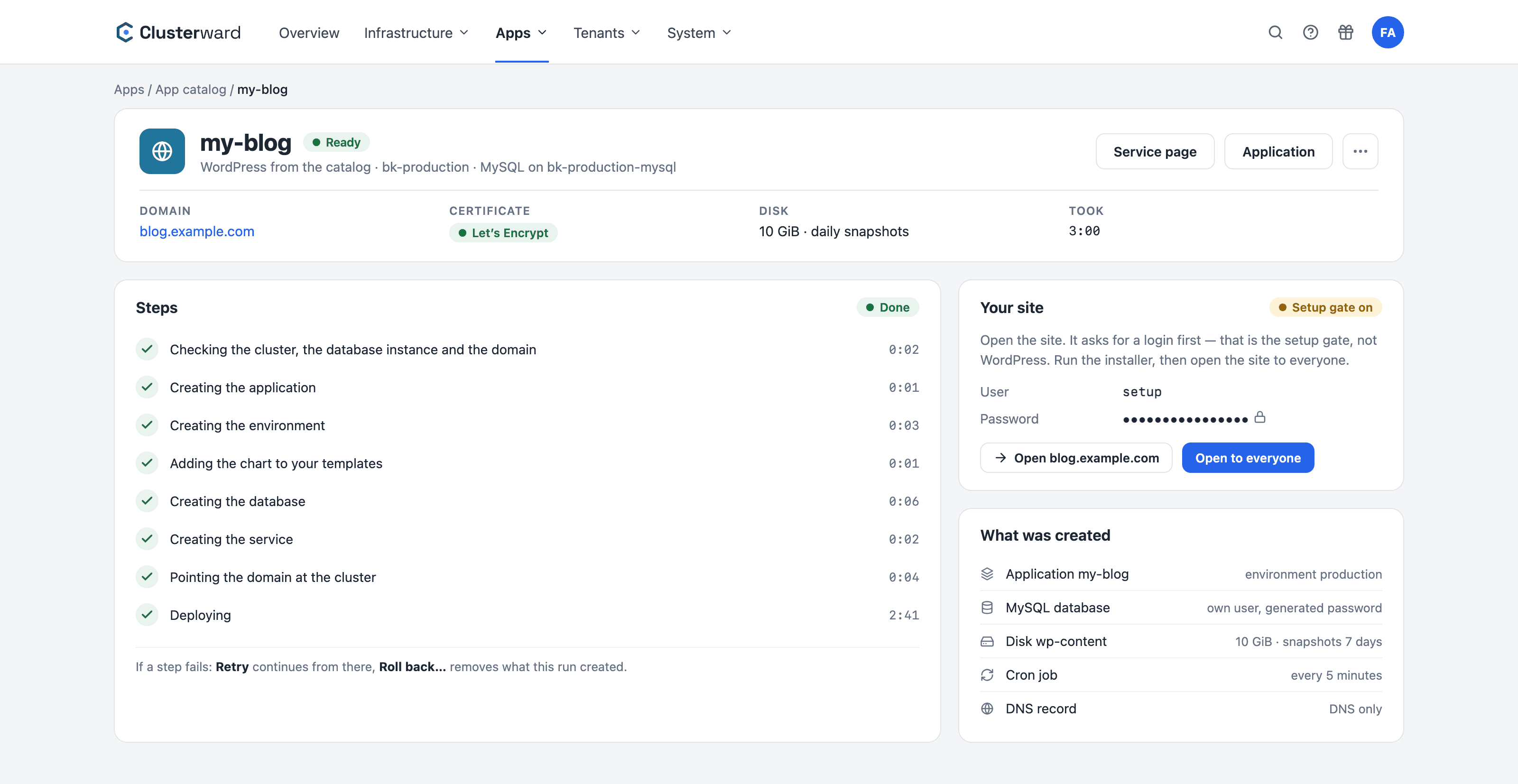
You enter a name, a domain, the cluster and your MySQL instance. Clusterward creates the application, database, disk with daily snapshots, cron job and certificate, then rolls out WordPress. Until you have finished the installation, a password keeps strangers off the site.

WordPress from the app catalog: all steps done, site behind the setup password
WordPress from the app catalog in the Clusterward cockpit: steps, setup password and created resources
Illustration: a simplified view. The product shows more details and options.
In brief

What the app catalog does for WordPress

Running WordPress on Kubernetes usually means picking a chart, writing values, creating a database, planning the disk, setting up cron, getting a certificate and hoping nobody opens the installer before you do. The Clusterward app catalog handles all of that with a template that we maintain and test live before adding it. The result is a perfectly ordinary application in your cockpit: every setting stays editable, and nothing is tied to the template afterward.

At a glance

Inputs
Name, domain, cluster, MySQL instance
Database
Dedicated MySQL database with its own user
Disk
10 GiB for WordPress, daily snapshots, 7 days
Cron
A real cron job every five minutes
Certificate
Let’s Encrypt, DNS record for a registered zone
Protection
Setup password until “Open to everyone”
How it works

From four fields to a running site

  1. 01

    Fill in

    Name, domain, cluster and MySQL instance – that is all the catalog asks for.

  2. 02

    Create

    Application, database, disk, service and DNS record are created, every step visible.

  3. 03

    Set up

    Run the WordPress installer behind the setup password and create your admin account.

  4. 04

    Open

    “Open to everyone” removes the protection; after a minute the site is reachable for everyone.

What’s included

What every WordPress site from the catalog includes

Everything that makes WordPress on Kubernetes stable is set up from the start.

Dedicated database

A MySQL database with its own user on your instance. The password is generated and only referenced in the values, never written into them.

Disk with snapshots

WordPress, themes, plugins and uploads live on a 10 GiB disk with daily snapshots, kept for seven days and restorable with one click.

A real cron job

A Kubernetes cron job calls WP-Cron every five minutes. Scheduled posts and plugin tasks run on time, even when nobody visits the site.

Protection against rogue installers

A fresh WordPress site belongs to whoever opens the installer first. That is why the site asks for a setup password until you are done.

Certificate and DNS

The domain gets a Let’s Encrypt certificate. If the zone is managed in Clusterward, the DNS record is created along with it.

Retry or roll back

If a step fails, the run page tells you why. “Retry” picks up from there; “Roll back…” removes everything the run created.

A normal application afterward

Resources, domains, networking, values: everything can be changed on the usual pages. Clusterward writes a new domain into the chart’s host; the template itself no longer writes anything.

Logs and monitoring included

Logs from all instances, 30 days of usage and uptime checks work for the WordPress site just as they do for any service.

Many sites, one instance

Each additional site gets its own application and database on the same MySQL instance – ideal for agencies with many client sites.

Standards, not DIY

Built on standards

  • Official WordPress image

    The site runs on the official WordPress container, not on a custom build. New sites run the tested major version 6; to upgrade, change the image tag on the service.

  • Helm chart in your templates

    The chart sits in your templates as “WordPress (catalog)”. A new chart version becomes the next version; existing sites keep theirs.

  • Scaleway Managed MySQL

    The database lives on your MySQL instance in the private network, backed up by Scaleway.

  • Block Storage

    The disk is Scaleway Block Storage, backed up as snapshots in your project.

What changes

WordPress on Kubernetes with and without the catalog

Facts

What you prepare, what the catalog creates

You need two things in the cluster beforehand; everything else is created during the run.

ComponentWhoNote
Cluster with NGINX ingress controllerYou, onceCluster page → Ingress controller
MySQL instance in the same clusterYou, onceCluster page → Managed databases, about ten minutes
DNS zoneOptionalRegistered: record created automatically, otherwise by hand
Application and production environmentCatalogIts own namespace on the cluster
Database, disk, cron, certificateCatalogDaily snapshots, seven days
WordPress admin accountYouIn the installer, behind the setup password
Also in the app catalog

Uptime Kuma: your own status monitor

Uptime Kuma checks your websites and services from the outside and shows availability and outages on status pages. From the app catalog, a name, a domain and the cluster are enough; no database is needed. As with WordPress, a setup password keeps strangers out until you have created your account; after that, “Open to everyone” opens the site.

At a glance

Inputs
Name, domain, cluster
Database
None, data in SQLite
Disk
2 GiB, daily snapshots
Container
Official image, version 2, without root rights
Protection
Setup password until “Open to everyone”
Further reading

How WordPress fits in

How the disk is backed up and restored is shown in Volumes & snapshots; you create the database instance under Managed databases.

If you run many client sites, Agencies & studios covers roles per client; logs and uptime checks for every site are described in Logs & monitoring.

Related pages

What goes with it

FAQ

Frequently asked questions about WordPress on Kubernetes

  • A cluster with the NGINX ingress controller and a MySQL instance in the same cluster. You set up both once on the cluster page. The catalog never creates an instance itself: that takes about ten minutes and is billed separately by Scaleway.

Can’t find your question? Write to us – we usually reply on the same business day.

Ask a question

WordPress on Kubernetes in the demo

Together we create a WordPress site, run the installer behind the setup password and back up the disk with a snapshot.