Clusterward
Migrating from AWS, Azure & GCP

Moving to Scaleway: leave the hyperscaler without a big bang

A move to Scaleway rarely fails because of Kubernetes – it fails because of everything around it: networking, databases, buckets, DNS, certificates. Clusterward builds the new environment securely, brings data over from AWS, Azure or Google Cloud and moves your hosts one at a time – the old environment keeps running until everything is green.

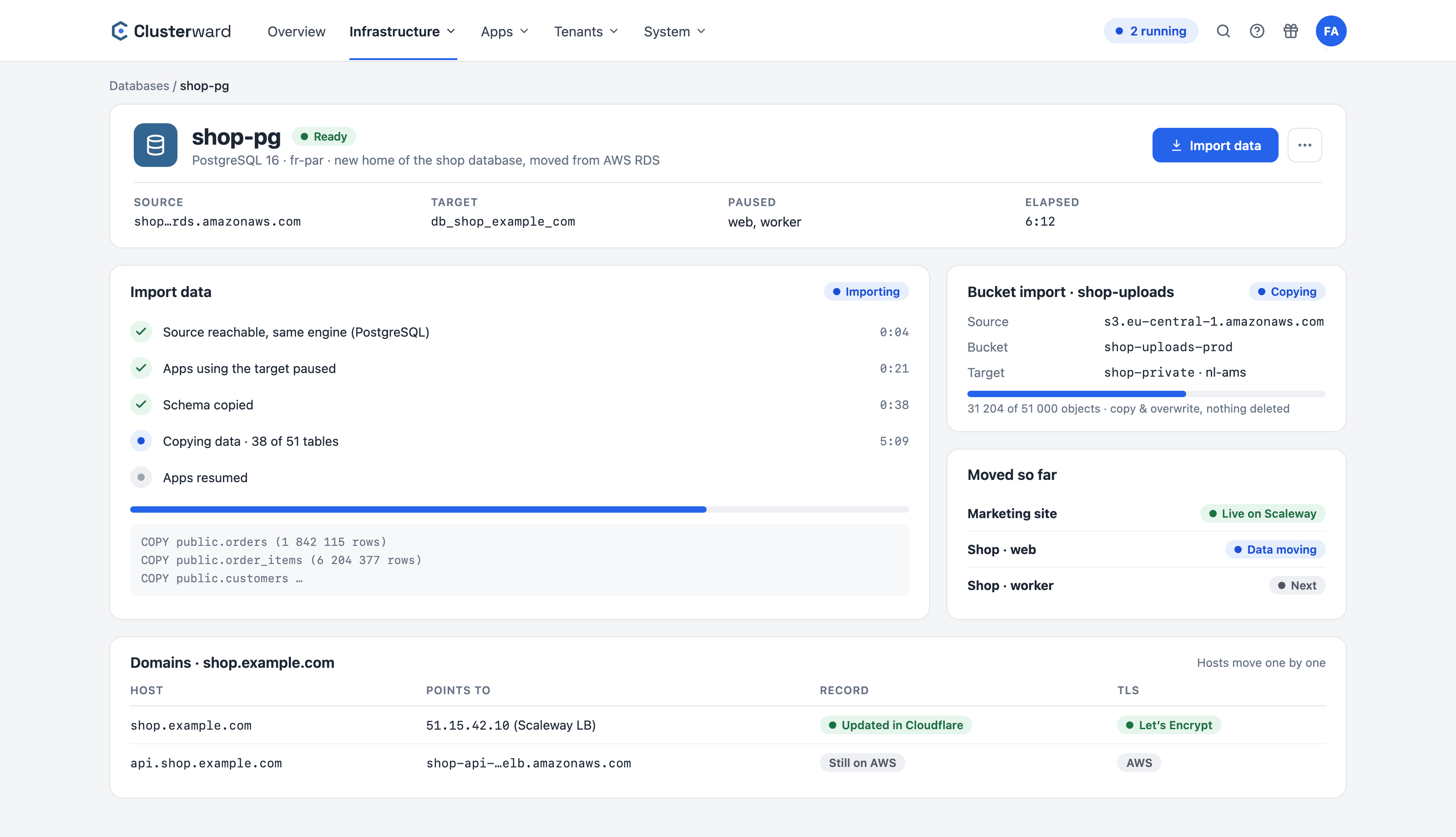
Database import from AWS RDS and bucket copy from S3 in the Clusterward Cockpit
Import overview in the Clusterward cockpit: database and bucket import from AWS, hosts before the move
Illustration: a simplified view. The product shows more details and options.
In brief

What a move to Scaleway with Clusterward involves

A move to Scaleway with Clusterward means the target environment is created in your own Scaleway project – a Kapsule cluster in a Private Network, nodes without public IPs, a Managed Database reachable only privately, your own Container Registry. Then you move application by application: connect the image or Git repository, import the data, switch the host. Clusterward manages only the new side; EKS, AKS or GKE stay untouched until you shut them down yourself.

At a glance

Target
Scaleway Kapsule in Paris, Amsterdam or Warsaw
Databases
Import from Postgres or MySQL, same engine
Buckets
Copy from S3-compatible sources, nothing is deleted
Migration
Host by host, the old environment keeps running
DNS
Automatic for Cloudflare zones, otherwise one record by hand
Plan
From €99 per month, billed by cluster
How it works

From hyperscaler to Scaleway in four steps

  1. 01

    Target environment

    Clusterward creates the cluster, Private Network, gateway and registry in your Scaleway project.

  2. 02

    Application

    Connect a Git repository, a ready-made image or a Helm chart and roll it out alongside the old environment.

  3. 03

    Data

    Import the database and buckets while the apps on the target are paused.

  4. 04

    Switch over

    Point the host at Scaleway; the certificate follows automatically. Next application.

What’s included

What Clusterward takes care of during the move

The parts that otherwise cost weeks in a cloud migration are a form in the cockpit.

Secure by default

The new cluster starts in a Private Network, with nodes without public IPs and the API server reachable only from your address ranges. No hardening after the move.

Database import

Schema and data from RDS, Azure Database or Cloud SQL into a Managed Database. The import runs in the cluster; the affected apps pause and start again afterward.

Bucket copy

Copy objects from an S3-compatible bucket into a Scaleway bucket, with a progress indicator. Copy and overwrite, never delete – a second run is safe.

Your own registry

Every cluster gets a private registry in your own project. Images are built in the cluster or with GitHub Actions and rolled out from your registry.

Secrets in Secret Manager

Environment variables and secrets per service, optionally in Scaleway Secret Manager. Secrets that already live there are adopted instead of being created again.

Move hosts one at a time

Every host gets ingress and a certificate. If the zone is on Cloudflare, Clusterward sets the record itself – it adopts an existing one and switches it instead of creating a second one; otherwise you switch one record.

What changes

Cloud migration with and without Clusterward

Facts

What becomes of your hyperscaler services

Most building blocks have a direct counterpart at Scaleway, which Clusterward manages.

TodayAt ScalewayWith Clusterward
EKS, AKS, GKEKapsuleCreation, node pools, upgrades
RDS, Azure Database, Cloud SQLManaged DatabaseInstance, databases, import
S3, S3-compatible bucketsObject StorageBuckets, keys, copy
ECR, ACR, Artifact RegistryContainer RegistryNamespace per cluster
Secrets Manager, Key VaultSecret ManagerSecrets per service
Route 53, Azure DNS, Cloud DNSCloudflare (recommended)Records and certificates
Further reading

The move in detail

How the target environment is created and which permissions the Scaleway key needs is covered under Cluster provisioning. The database import and its prerequisites are described in Managed databases.

Why data should live in EU data centers of a European provider is explained in Digital sovereignty. If you are coming from a Kubernetes platform rather than straight from a hyperscaler, read Migrating from Qovery.

The route service by service, with every pitfall, is described in the article From AWS to Scaleway: what becomes of RDS, S3 and Route 53.

Related pages

What goes with it

FAQ

Frequently asked questions about moving to Scaleway

  • No. Clusterward runs Scaleway Kapsule exclusively. Your existing cluster keeps running unchanged until you shut it down yourself after the move – Clusterward never accesses AWS, Azure or Google Cloud, except to read data you are importing.

Can’t find your question? Write to us – we usually reply on the same business day.

Ask a question

Walk through your move in the demo

We create a cluster, import a sample database and move a host – and estimate with you how long your move will take.