
Clusterward
Cluster updates

Kubernetes upgrades, node pools and add-ons in one place

Clusterward shows which Kubernetes versions are available, runs the Kubernetes upgrade after confirmation, scales node pools and keeps ingress controllers and cert-manager on tested versions.

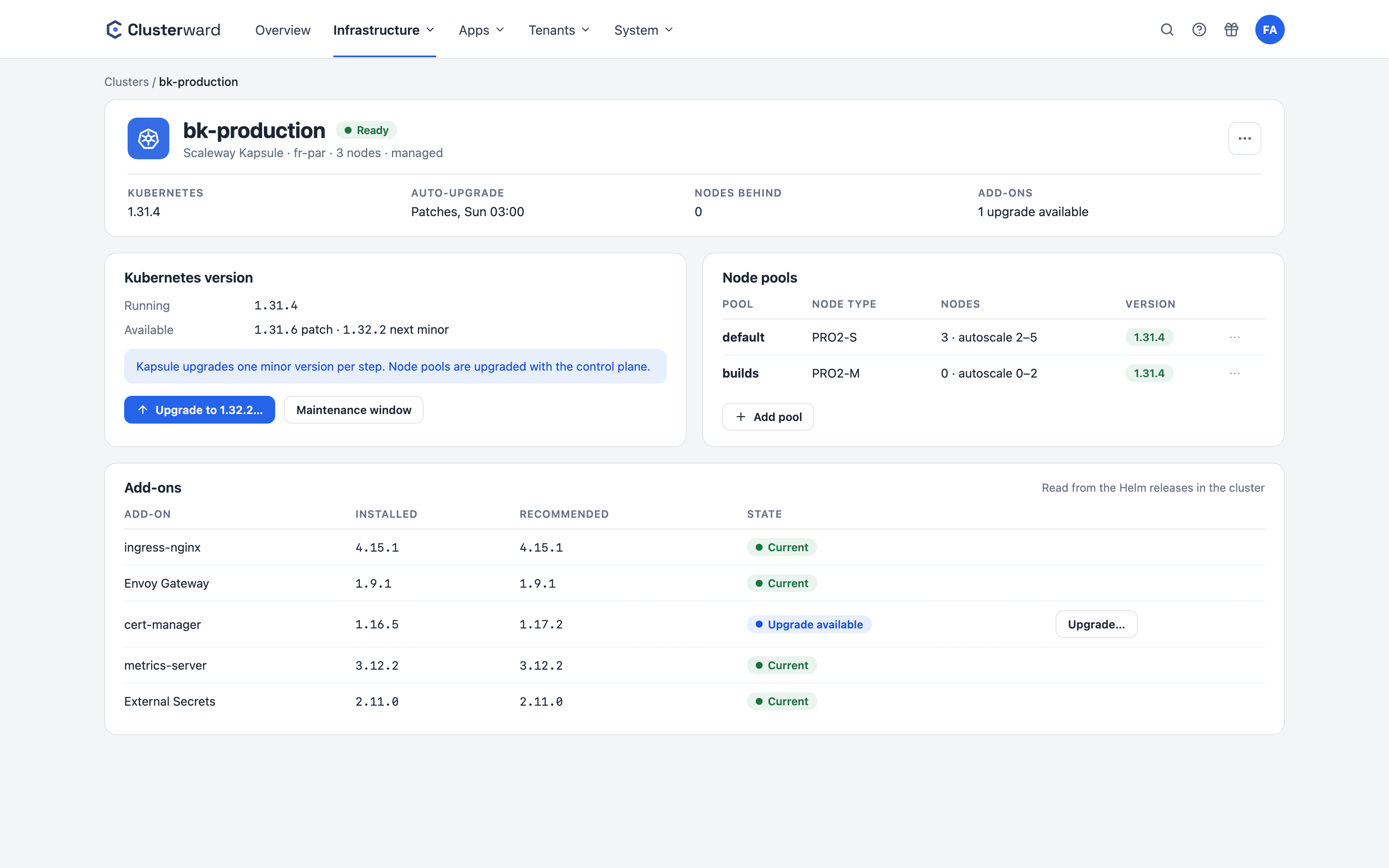
Cluster updates in the Clusterward Cockpit
Simplified view in the Clusterward cockpit: cluster updates
Illustration: a simplified view. The product shows more details and options.
In brief

What cluster updates in Clusterward cover

Cluster updates are the day-2 operations of a Kapsule cluster, run from the cockpit: upgrading Kubernetes to newer patch versions of the current minor or to the next minor version, creating, scaling and removing node pools, the maintenance window for automatic patches, and updating the add-ons Clusterward installed. Add-on versions come from a curated catalog with compatibility ranges; Clusterward reads what is installed in the cluster from the Helm releases themselves.

At a glance

Upgrade
Patch versions of the current minor and the next minor
Duration
Ten to thirty minutes, monitored in the background
Node pools
Create, scale, delete; the last pool stays
Auto-upgrade
Maintenance window for patch versions
Add-ons
Catalog with tested versions and compatibility
Notices
New versions as a notification, once per version
How it works

How an upgrade works

  1. 01

    Choose a target

    The version card shows only versions Kapsule can reach from here.

  2. 02

    Confirm

    Type the cluster name; refused while another upgrade is running.

  3. 03

    Control plane

    Scaleway updates the control plane; Clusterward polls the status.

  4. 04

    Node pools

    If you want, the pools are brought along; otherwise the cockpit shows “nodes behind”.

  5. 05

    Completion

    Success or failure is recorded in the audit log and reported as a notification.

What’s included

What cluster updates in Clusterward can do

What is otherwise scattered across the Scaleway console, Helm repositories and changelogs.

Version card

Current version, reachable targets, running upgrade with status. Kapsule moves one minor per step; the card only offers what is possible.

Live node pools

Pools are read from Scaleway and linked to the cluster’s nodes. Change the size, create new pools with a different node type, remove pools after typing the name.

Maintenance window

Automatic patch upgrades in a time window of your choice. Minor upgrades remain a deliberate decision.

Add-on catalog

Ingress controllers, cert-manager and other components in the versions Clusterward knows, including Kubernetes compatibility. Only what has run at least once is recommended.

Drift view

Clusterward reads what is installed from the Helm releases: up to date, update available, or incompatible with the cluster version. Add-ons removed by hand disappear from the list.

Add-on upgrades with a way back

An add-on upgrade uses the same values as the installation and remembers the previous version as a rollback target. Refused while a Kubernetes upgrade is running.

Standards, not DIY

Built on Kapsule and Helm

  • Kapsule API

    Versions, upgrades, pools and maintenance windows via the Scaleway API.

  • Helm releases

    Installed add-on versions from the release secrets, not from assumptions.

  • Version ranges

    kubeVersion ranges of every chart version, checked against the cluster.

  • Audit log

    Every upgrade with person, target and result.

What changes

Cluster operations with and without Clusterward

Facts

What Kapsule dictates and Clusterward builds in

The rules come from Scaleway. Clusterward makes them visible in the cockpit instead of returning them as errors.

RuleConsequence in the cockpit
One minor per upgradeThe version card offers patches and the next minor
A pool’s node type is fixedA different type means: create a new pool, remove the old one
Auto-upgrade only for patchesMinor upgrades remain manual and confirmed
Scaling down drains nodesThe cockpit points this out when scaling
Upgrades take timeBackground monitoring for up to three hours, then an error
Further reading

Updates in context

The add-ons updated here are installed by Cluster provisioning when the cluster is created. You learn about new versions via Notifications before you even open the cockpit.

Upgrades are an action of the “manage” permission level in the Provisioning area; see Security & access.

Related features

What goes with it

FAQ

Frequently asked questions about cluster updates

  • Newer patch versions of your current minor and the next minor version, as Kapsule allows. Two minor steps are two upgrades. The card reads the available versions live from Scaleway.

Can’t find your question? Write to us – we usually reply on the same business day.

Ask a question

See an upgrade in the demo

We show the version card on a real cluster, scale a pool and update an add-on.