Clusterward
Compliance & ISO 27001

ISO 27001 evidence at a click: the compliance page for your Kubernetes operations

Much of what an ISO 27001 audit asks about already happens in Clusterward: two-factor sign-in, roles, API tokens, the audit log, backups with restore tests, isolation, certificates. The compliance page brings it onto one page – with live checks and their Annex A control, reports as CSV, a signed access review and a compliance pack for your auditor.

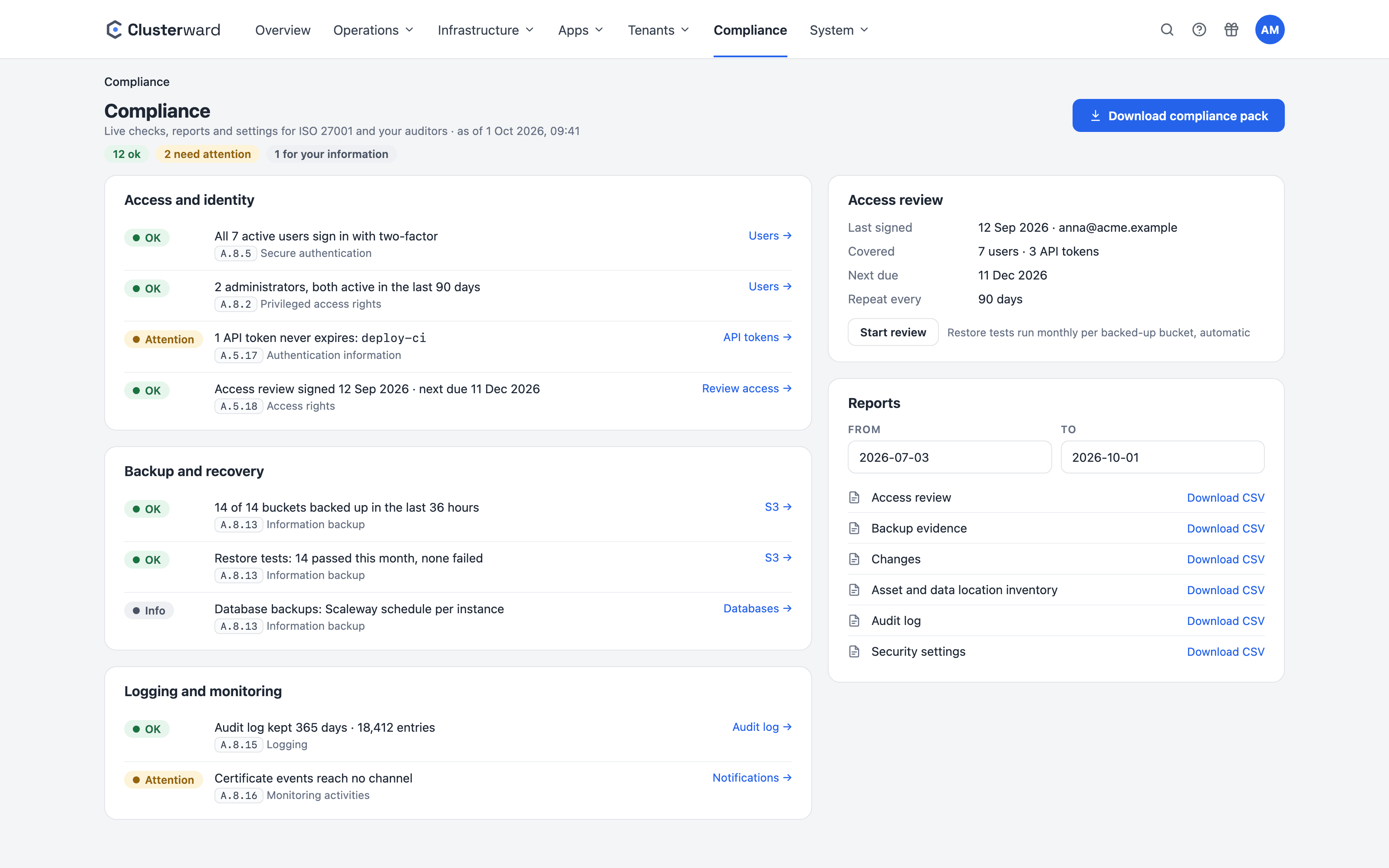
The compliance page in the Clusterward cockpit
The compliance page in the Clusterward cockpit with checks, access review and reports (simplified illustration)
Illustration: a simplified view. The product shows more details and options.
In short

What is the compliance page?

The compliance page is an item of its own in the cockpit’s main menu, meant for your information security officer and your auditor. It shows checks that Clusterward works out from your workspace’s stored state every time you open it – nothing is ticked by hand, so nothing can go stale. Each check names its control from ISO/IEC 27001:2022 Annex A and links the page where you change things.

At a glance

Checks
15, in five themes, worked out live
Controls
number and name from Annex A
Reports
six, as CSV for a period
Compliance pack
ZIP with a README and SHA256SUMS
Access review
signed, cycle of 30–365 days
For auditors
read-only, with a role of their own
The checks

Which checks the page works out

Each check reads OK, Attention, Problem or Info and names what is behind the number – the users, tokens or buckets. The control numbers are the standard’s, the same in every certification to the 2022 edition: you find each one in your own Statement of Applicability.

Documents written for the 2013 edition use other numbers – match those by the control’s name.

CheckControlAttention or problem when
Two-factor sign-inA.8.5 Secure authenticationan active user has not enrolled (pending invitations are counted apart)
AdministratorsA.8.2 Privileged access rightsan administrator has not signed in for 90 days
API tokensA.5.17 Authentication informationa token never expires or was not used for 90 days
Access reviewA.5.18 Access rightsnone was signed yet, the next one is due within 14 days, or it is overdue
Sign-in protection and sessionsA.8.5 Secure authenticationsessions stay open longer than 4 hours without activity, or more than 10 failed attempts are allowed
Bucket backupsA.8.13 Information backupbuckets exist without a backup target, the target is not ready, or a bucket had no good backup for 36 hours
Restore testsA.8.13 Information backupthe latest test failed, or a backed-up bucket was not tested this month yet
Database backupsA.8.13 Information backupinformation only – Scaleway backs up each instance on its own schedule
Audit logA.8.15 Loggingit is kept fewer than 365 days
Security notificationsA.8.16 Monitoring activitiessign-in, backup and certificate events reach no channel
IP allowlistA.8.20 Networks securityinformation only – whether the cockpit answers every address
Environment isolationA.8.22 Segregation of networksan environment where isolation is offered is not isolated
CertificatesA.8.24 Use of cryptographya wildcard certificate expires within 14 days or is not ready
Cluster add-onsA.8.8 Management of technical vulnerabilitiesan upgrade is available or an add-on no longer fits its Kubernetes version
Configuration checkA.8.9 Configuration managementthe last check found differences or is older than 7 days
How it works

From the audit request to the compliance pack

  1. 01

    Open the page

    “Compliance” in the main menu: the OK, attention and problem count at the top, the checks by theme below.

  2. 02

    Fix what is flagged

    Every check links the page where you change it – users, tokens, backups, notifications.

  3. 03

    Review access and sign

    “Start review” lists every user and token; after the clean-up, “Sign review” with a note.

  4. 04

    Download the pack

    “Download compliance pack” puts all six reports of a period into one ZIP with a README and checksums.

What’s included

What the compliance page brings

Live, not ticked

Every check is worked out from the stored state when you open the page. A change in the cockpit shows at once.

Control with number and name

Next to A.8.5 or A.8.13 stands the name from Annex A – in the compliance pack too. So you find each in your SoA.

Six reports as CSV

Access, backup evidence, changes, inventory with data locations, audit log and security settings.

Compliance pack with checksums

One ZIP with every report, a README and SHA256SUMS – sha256sum -c later proves that nothing was changed.

Signed access review

Who signed when, how many users and tokens, plus a SHA-256 of the access list as evidence.

Read-only for auditors

The page needs the same permission as the audit log. An auditor role sees and downloads everything, changes nothing.

Reports

The reports an audit asks for

You pick a period, by default the last 90 days, at most 400. It applies to the reports of things that happened; the others describe the state now. Every download is recorded in the audit log – the evidence itself has a trail too.

ReportContentCovers
Access reviewevery user and API token: role and what it allows, application scope, 2FA, status, last activity, expirystate now
Backup evidenceevery bucket backup, restore and restore testperiod
Changesevery deploy, restart and rollback with version, result and who started itperiod
Asset and data location inventoryclusters, database instances, buckets, the backup target, DNS zones, secret stores, environments and services with provider and regionstate now
Audit logevery recorded action of the period; secret-looking values redactedperiod
Security settingsthe values in force: sign-in protection, sessions, allowlist, retention, backups, which channel receives which eventstate now
Access review

The access review: regular and on record

ISO 27001 asks you to review access at fixed intervals – and to show that you did (A.5.18). “Start review” lists everyone who can reach the workspace: users and API tokens with role, application scope, two-factor, status and last activity. You tidy up under Users, Roles or API tokens, come back and sign.

The signature records who signed when, how many users and tokens there were, and a SHA-256 of the access list – the evidence, without keeping a second copy of the list. Two weeks before the due date the check turns amber, after it red, and “Access review overdue” is sent once to the subscribed channels.

Access review

Cycle
30–365 days, default 90
Reminder
14 days before it is due
Overdue
problem + notification
Evidence
name, time, counts, SHA-256
Kept in
audit log and workspace export
Signing
permission “audit: operate”
What changes

Audit preparation with and without the compliance page

Further reading

Compliance in context

Where the evidence comes from is described on the pages for Security & access – roles, mandatory 2FA, audit log – and S3 backups, whose restore tests feed the backup evidence.

How the evidence fits into an NIS2 or ISO 27001 preparation is shown under Audit & NIS2. Which events reach you as an e-mail or webhook is listed under Notifications.

Related pages

What goes with it

Audit & NIS2

Which evidence operations supply for NIS2 Art. 21 and ISO 27001.

Go to Audit & NIS2

S3 backups

Nightly copies with Object Lock, tested monthly, with evidence.

Go to S3 backups
FAQ

Frequently asked questions about the compliance page

  • No, no software can. A certification also requires a risk assessment, policies, training, an internal audit and a management review. The compliance page supplies the evidence for the technical controls of your Kubernetes operations – an auditable part of it, not the whole.

Your question isn’t here? Write to us – we usually reply the same working day.

Ask a question

The compliance page in the demo

Bring your checklist: we open the checks, sign an access review and download a compliance pack.