
Clusterward
Security & access

Secure by default: RBAC, mandatory 2FA and an audit log for everything

Every user has a role and an application scope, every sign-in requires a second factor, every change is recorded in the audit log. Credentials are stored encrypted and never output again.

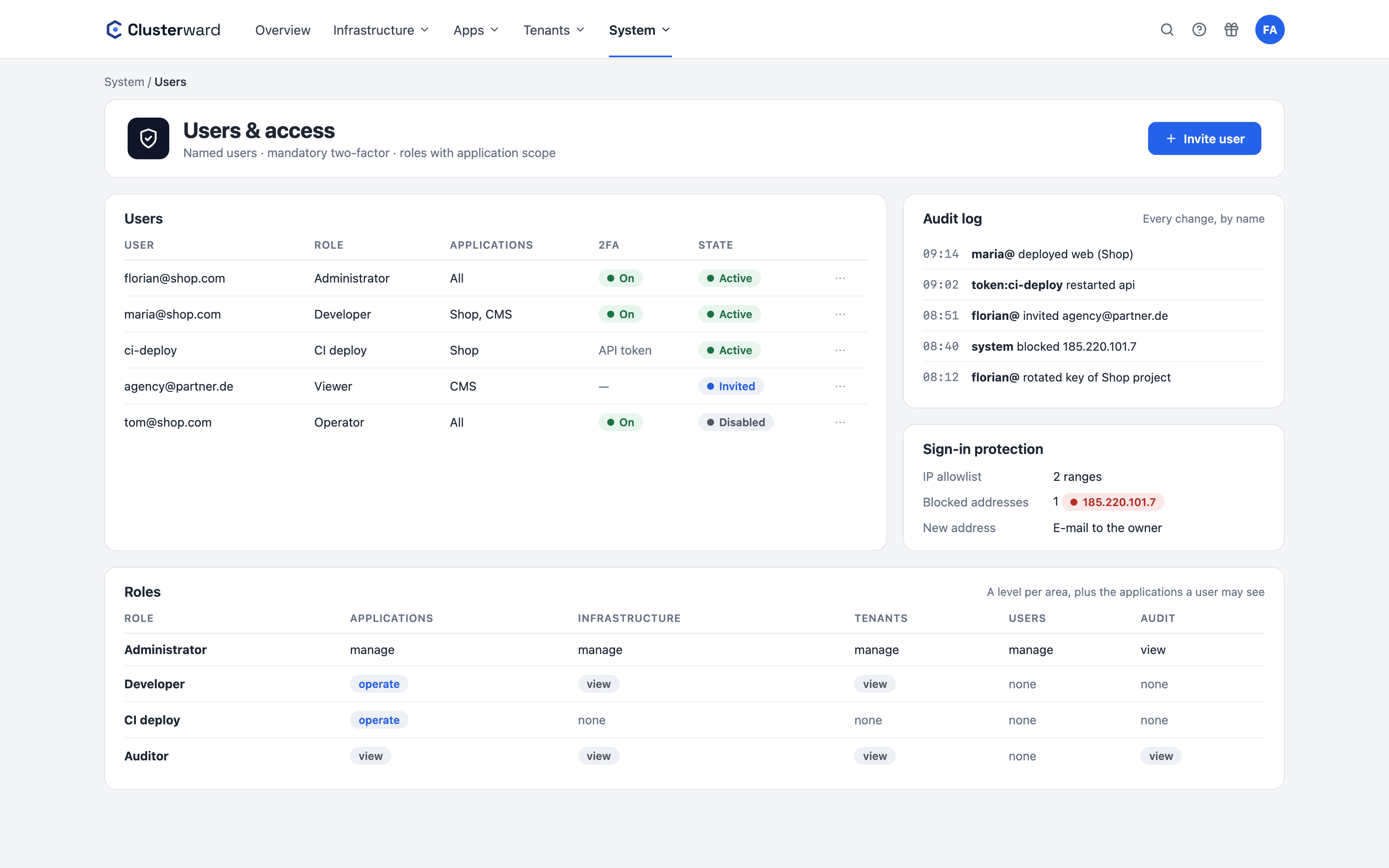
Users, roles and audit log in the Clusterward Cockpit
Simplified view in the Clusterward cockpit: users, roles and audit log
Illustration: a simplified view. The product shows more details and options.
In brief

What security and access mean in Clusterward

Security in Clusterward starts at sign-in: named users with a password and mandatory 2FA via TOTP, account lockout and rate limiting. RBAC sits on top of that: each role assigns one level per area, from “no access” to “manage”, plus an application scope that limits a user to their own applications and everything below them. Every route is locked by default until it is mapped to a permission. Every change writes an audit entry with person, action and object, never with secrets. And every customer gets their own workspace with its own database, its own key and its own backup bucket.

At a glance

Sign-in
Password, mandatory 2FA, recovery codes, lockouts
RBAC
Roles with levels per area, plus application scope
Audit
Every change with person, action, object
Secrets
AES-256-GCM, write-only, verified before saving
Network
IP allowlist per workspace, Cloudflare-aware
Isolation
Separate database, key and bucket per workspace
Cluster
Operator confined to its own namespaces, environments can be isolated
How it works

What stands between user and cluster

  1. 01

    Sign in

    Password plus TOTP code; too many attempts lock the account.

  2. 02

    Check address

    The workspace IP allowlist applies before sign-in, using the real client address.

  3. 03

    Apply role

    The route requires a level in an area; without a mapping, it is locked.

  4. 04

    Check scope

    A user sees only their own applications and everything attached to them.

  5. 05

    Log

    The change lands in the audit log; the message goes to the channel without any secret.

What’s included

What security in Clusterward means in practice

Not a checklist for later, but defaults you don’t have to switch off.

Sign-in and accounts

Two factors for everyone, invitations instead of shared passwords.

  • Mandatory 2FA

    Every user sets up TOTP before they start working. The secret is stored encrypted, sign-in attempts are limited per address, and accounts lock after failed attempts.

  • Invite instead of sharing passwords

    New users get a link to set their own password. Even the first administrator of a workspace starts with an invitation.

  • Forgot your password, lost your phone

    A link resets the password; ten one-time recovery codes replace the authenticator. 2FA always remains mandatory.

  • Lockouts during attacks

    An address with too many failed attempts is blocked for one hour, and for a day if it happens again. A sign-in from a new address triggers an email to the account owner.

  • Sessions that expire

    A session ends after two hours without activity and after twelve at the latest. New passwords need at least 12 characters, new recovery codes require the current code from your authenticator app, and the cockpit accepts changes only from its own address.

Permissions and traceability

Everyone may do only what they need, and every action has a name.

  • Roles and application scope

    A role is a matrix of areas and levels. The built-in administrator has everything, every other role only what it needs; everyone grants roles, scopes and API tokens only within their own rights. A scope restricts users to their own applications, databases and buckets – including tenant runs, backups and bucket keys.

  • API tokens with fixed limits

    Tokens for CI pipelines carry a role, an application scope and an expiry date. They can never manage tokens, users or roles, never be administrator, and every action is recorded under their name in the audit log.

  • Audit log

    Every mutation, every dump download, every key rotation: person, time, action, object. Secret values never appear in it, only their type. Searchable and filterable in the cockpit under System → Audit log; an auditor role can read along without managing users.

  • Customer data, read-only

    The SQL console has a permission of its own that follows from no database right. It queries with its own read-only login in a read-only transaction, and every query is in the audit log with text, row count and duration – never with values. API tokens cannot use it.

Credentials and secrets

Once something is saved, it never comes back out.

  • Write-only credentials

    Scaleway keys, kubeconfigs, Git tokens and database admin credentials are verified before saving, stored encrypted and never returned. Only application variables and connection details you need to copy are readable. Entering and rotating them requires the manage level – as does any change to where a stored credential is sent.

  • Secrets no one can read back

    Once saved, secrets can only be overwritten, even by administrators. If you want, they live in the Scaleway Secret Manager of your project, with versions and rotation.

Network and cluster

Who can reach the workspace and the Kubernetes API – and what may run in the cluster.

  • IP allowlist

    A workspace can be restricted to address ranges; the check knows Cloudflare addresses and rejects spoofed headers. Locking out your own address is prevented.

  • Cluster API access

    The card on the cluster shows which addresses may reach the Kubernetes API. After an IP change, “Add my IP” saves you the trip to the Scaleway console.

  • Isolated environments

    One click gives an environment network policies: only the ingress controllers and its own pods get in, and the nodes’ metadata service stays out of reach. System → Security shows which environments are still open. When an ingress controller is added or removed, the policies adjust themselves; anyone with the manage level can remove the isolation again.

  • Operator confined to its own namespaces

    The cluster identity reads the cluster without secrets and writes only in the namespaces it created for your environments; policies on the cluster enforce this. Admin access for add-ons lasts one hour, and builds push with a registry-only key. From Kubernetes 1.30.

  • Hardened workloads

    Pods with seccomp, no privilege escalation and no capabilities. Your environments’ namespaces run with Pod Security “baseline”; where a running pod still violates it, the cockpit reports it instead of stopping the pod.

Standards, not DIY

How Clusterward itself is built

  • No cloud SDK

    Scaleway, Cloudflare and Kubernetes are addressed through their HTTP APIs; dependencies stay small.

  • Encryption

    AES-256-GCM per workspace with its own data key, wrapped by the platform key.

  • Isolation

    Separate database and backup bucket per workspace, no shared tables.

  • Location

    Operated on Scaleway in the EU by BitKollegen GmbH.

What changes

Access with and without Clusterward

Facts

Roles: areas and levels

A role assigns exactly one level per area. On top of that comes “all applications” or a list of specific applications.

LevelAllowedExample
no accessNothing in this areaDeveloper without cluster visibility
viewReadSupport reads deployments and logs
operateDay-to-day: deploy, restart, createDeveloper rolls out their application
manageDelete, enter credentials, upgrades, write Helm chartsTeam lead manages clusters
AdministratorEverything, fixed, not editableWorkspace operator
Further reading

Security in context

The restricted operator identity is created by Cluster provisioning; hardened pods and NetworkPolicies are part of Deployments.

Where your data resides and why operating in the EU is a deliberate choice is explained under Digital sovereignty. Answers to GDPR questions and the data processing agreement are available via Contact.

Related pages

What goes with it

Deployments

Git, container image or Helm chart – rolled out with a health check.

Go to Deployments
FAQ

Frequently asked questions about security & access

  • Yes, for every user, without exception. On first sign-in, a TOTP secret is set up and stored encrypted. Without a second factor there is no access to the cockpit and no access to the API.

Can’t find your question? Write to us – we usually reply on the same business day.

Ask a question

Discuss security in detail

In the demo, we show roles, the audit log and isolation on a real workspace and answer your questions about GDPR and the DPA.