
Clusterward
Networking & ingress

Kubernetes ingress with rate limits, CORS and basic auth per service

Clusterward renders Ingress or Gateway API resources for every service, shows the controller’s default for every network setting, and switches between ingress-nginx and Envoy Gateway without a single host going down.

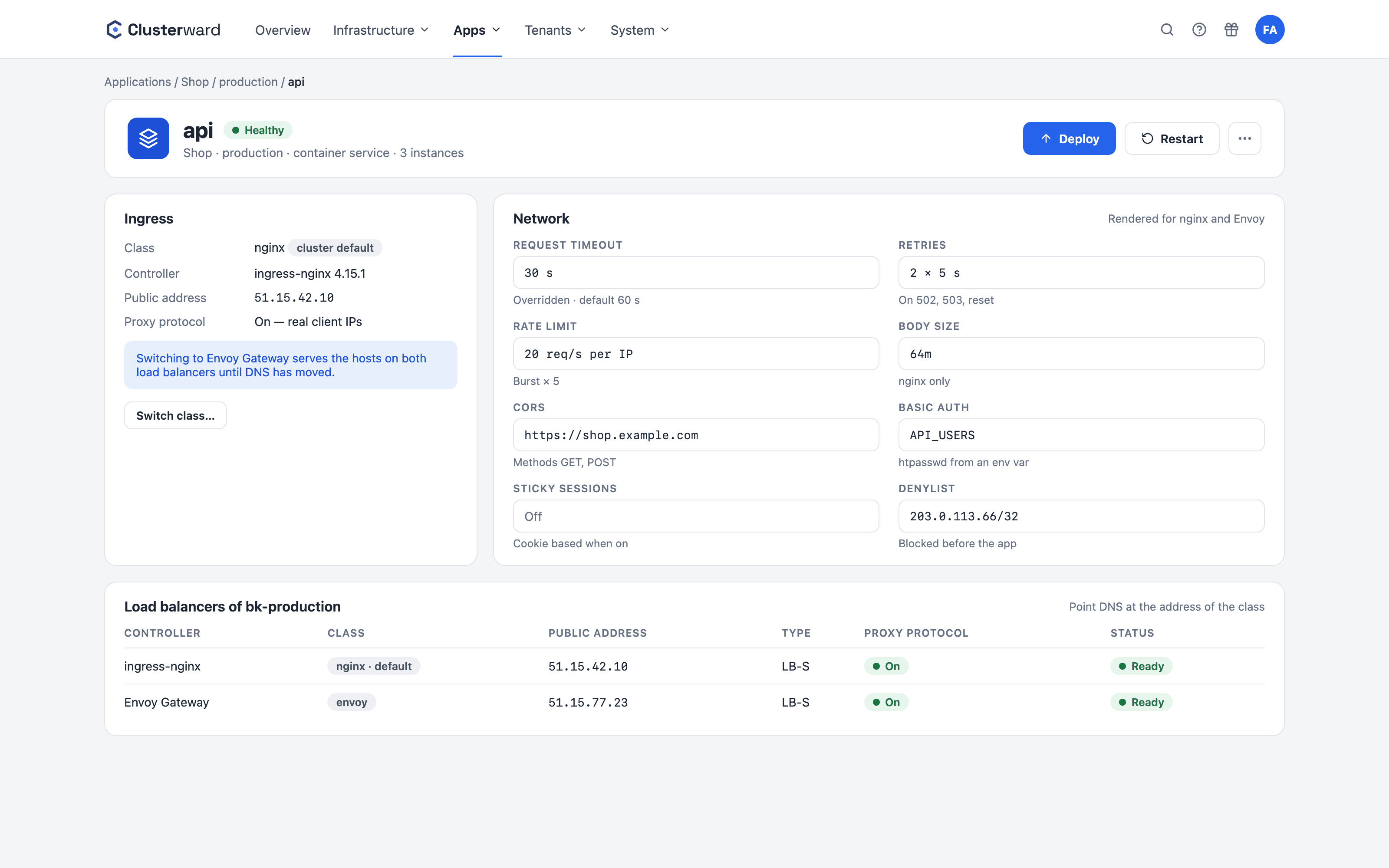
Network settings of a service in the Clusterward Cockpit
Simplified view in the Clusterward cockpit: network settings of a service
Illustration: a simplified view. The product shows more details and options.
In brief

What networking & ingress covers in Clusterward

Networking & ingress in Clusterward is the layer between the internet and your service: for every service, Clusterward generates the Kubernetes Ingress for ingress-nginx, or a Gateway and HTTPRoute for Envoy Gateway, with TLS, redirects and IP allowlists per domain. On top of that come network settings such as timeouts, retries, rate limits, CORS, basic auth and sticky sessions – described once and translated for both controllers. Moving a service to a different controller runs as a cutover in which both load balancers serve the hosts until DNS has moved.

At a glance

Controllers
ingress-nginx and Envoy Gateway
Settings
Timeouts, retries, rate limits, CORS, basic auth
Standards
Visible per field, overrides marked
Switching
Cutover with a plan per host, two load balancers and the DNS move
Client IP
Real address via proxy protocol and Cloudflare
Access
IP allowlists and blocklists per domain
How it works

From host to service

  1. 01

    Add a domain

    Host on the service, with TLS via Let’s Encrypt, wildcard or Cloudflare.

  2. 02

    Choose a controller

    The service’s own class or the cluster default, visible in the Network block.

  3. 03

    Configure settings

    Timeouts, limits and protection, each next to its default value.

  4. 04

    Roll out

    Ingress, or Gateway and HTTPRoute; outdated objects are removed.

  5. 05

    Switch without downtime

    First a plan per host, then both load balancers serve traffic until DNS has moved.

What’s included

What networking & ingress includes

Everything that is otherwise scattered across annotations and policy objects sits on one card per service.

Two controllers, one model

The same setting is translated into annotations for ingress-nginx and into HTTPRoute and policies for Envoy Gateway. Anything a controller can’t do is flagged on the card instead of being silently dropped.

Rate limits and circuit breakers

Requests per second or minute with burst, limited by address range or per header value such as an API key. Envoy additionally caps connections and pending requests.

Timeouts and retries

Request, connection and idle timeouts; retries with per-attempt timeouts and triggers. Every field shows the default – for example, 60 instead of 15 seconds.

CORS, basic auth, blocklists

CORS rules, password protection from an environment variable and blocked address ranges per service. If the basic auth variable is missing, the deployment aborts instead of leaving the host open.

Controller switch without downtime

Before it starts, Clusterward shows for every host what happens to DNS and the certificate. During the cutover, the old and the new load balancer serve the hosts with valid certificates; Clusterward moves its own records and completes the switch one hour after every host points to the new address.

Real client address

Proxy protocol on the Scaleway Load Balancer and Cloudflare’s address ranges ensure that apps and IP allowlists see the real visitor.

Standards, not DIY

On standard controllers

  • ingress-nginx

    The widely used ingress controller, with annotations per service.

  • Envoy Gateway

    Gateway API with a shared proxy fleet and a single load balancer.

  • cert-manager

    Certificates via HTTP-01 or DNS-01, including for Gateway API.

  • Scaleway Load Balancer

    With proxy protocol; status and type visible in the cockpit.

What changes

Ingress with and without Clusterward

Facts

Settings and controllers

Most settings apply to both controllers. Where they don’t, the card tells you.

SettingSupported by
Request and connection timeoutsnginx and Envoy
Retries with triggersnginx and Envoy
Rate limit per address or headerEnvoy; basic limit also nginx
CORS and basic authnginx and Envoy
Body size and bufferingnginx
Circuit breakers and header rulesEnvoy
IP allowlist per domainnginx and Envoy
Further reading

How networking fits in

Hosts, certificates and DNS records belong to DNS & certificates. Clusterward installs and updates the controllers themselves via Cluster updates.

Which addresses can reach your workspace at all is governed by the IP allowlist under Security & access.

Related pages

What goes with it

Deployments

Git, container image or Helm chart – rolled out with a health check.

Go to Deployments
FAQ

Frequently asked questions about networking & ingress

  • ingress-nginx is the proven choice and handles body size and buffering. Envoy Gateway offers finer-grained rate limits, circuit breakers and header rules, and bundles all services behind a single load balancer. You can run both side by side.

Can’t find your question? Write to us – we usually reply on the same business day.

Ask a question

Networking in the demo

We set a rate limit, protect a host with basic auth and switch a service from nginx to Envoy Gateway without any downtime.